
IPS glow and backlight bleed can look like the same problem: bright corners or pale areas on a dark screen. They are not the same thing, and a phone photo can make both look much worse than they do from your chair.
The useful question is not whether a black test screen looks perfectly black in a dark room. It is whether the appearance changes when your viewing position changes and whether it distracts you during normal use.
What you may actually be seeing
The bright area may be IPS glow, fixed light leakage, broader panel uniformity, a reflection, or a camera-exposure artifact. Start by separating those possibilities instead of assuming every bright corner is backlight bleed.
IPS glow and fixed light leakage are different
Swipe sideways to compare columns.Scroll table to view all columns.
| IPS glow | Fixed light leakage |
|---|---|
| Changes as your viewing angle or distance changes | Stays in the same place on the panel |
| Usually appears near corners on IPS-type LCD panels | Can appear along an edge or in a localized patch |
| Often looks silver, blue, or bronze on dark content | Looks like a bright area showing through dark content |
| More noticeable when viewing the panel from an angle | More relevant when visible straight on from your normal seat |
Dell’s U.S. support guidance makes the same practical distinction: IPS glow changes with viewing angle and distance, while light leakage remains tied to the same panel area. Light leakage can occur on LCD panels beyond IPS, so “IPS glow” is not the right label for every monitor with bright edges.
Check it without making the result look worse than it is
Use this order:
- Turn the monitor on and let it run in its normal setup before judging it. Dell recommends about 30 minutes before making adjustments, but that is a practical reference—not a universal cutoff. The more important factors are your normal brightness, viewing angle, distance, and room lighting.
- Put it at the height, angle, and distance where you normally use it.
- Leave some ordinary room light on instead of testing in complete darkness first.
- Set brightness close to the level you use every day.
- Display a full-screen black field, then a dark-gray field.
- Look straight at the screen from your usual seat.
- Move your head slightly left, right, up, and down.
- Note whether the bright area shifts, fades, or stays fixed.
- Check a white or bright page before deciding how serious the result is.
The backlight bleed test gives you a consistent dark field for the comparison. It is useful evidence, but it cannot decide whether a manufacturer or retailer will approve a return.
What IPS glow usually looks like
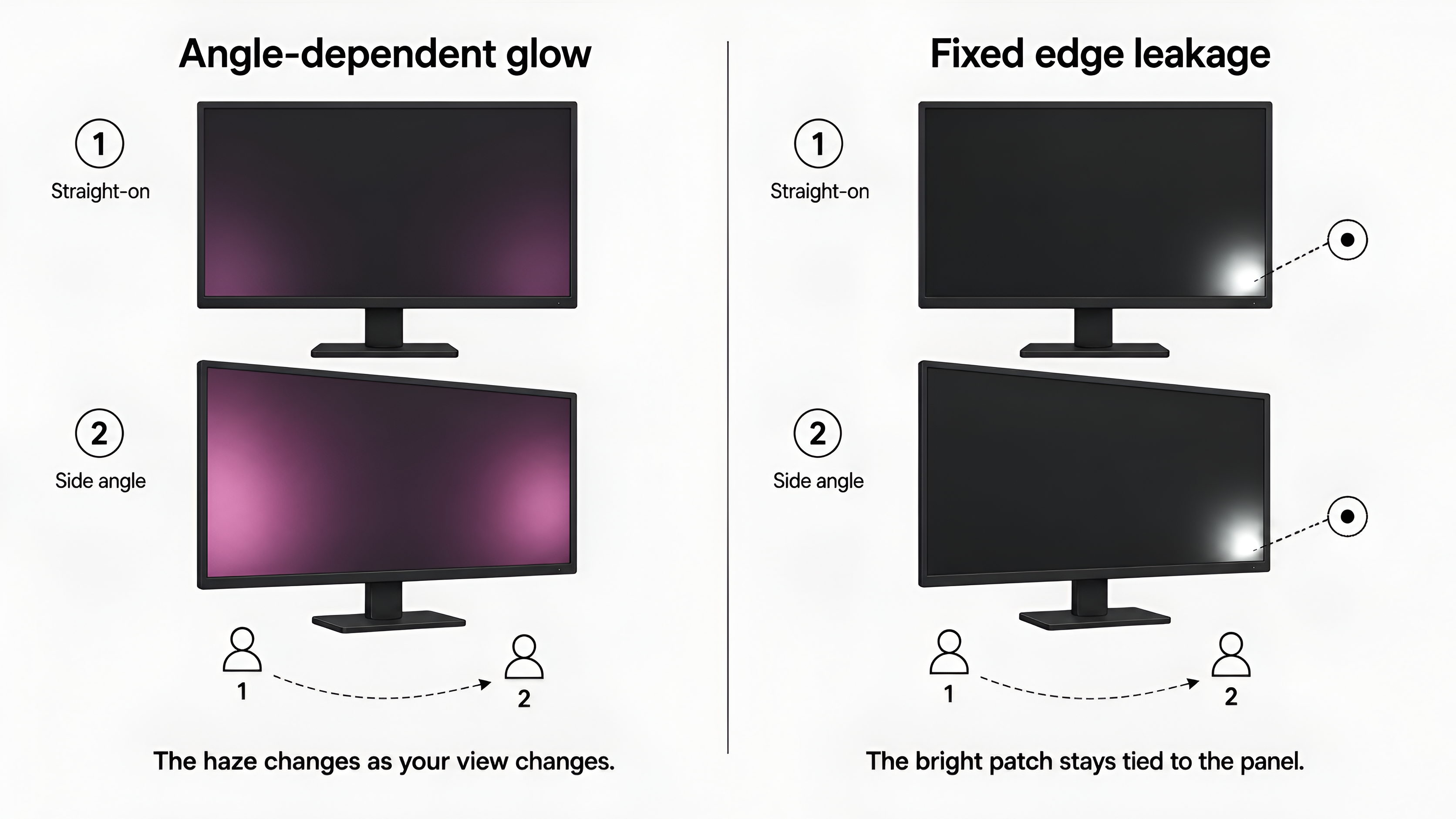
The result is more consistent with IPS glow when the corner haze changes noticeably as you move your head or alter the monitor’s angle. It is often strongest on dark content and may become much less distracting from the normal viewing position.
That does not mean every amount of glow is comfortable. If it is obvious during ordinary work, movies, or games from your usual seat, record that fact. The question is how the panel behaves in the way you use it, not whether a replacement panel would show absolutely none.
What fixed light leakage usually looks like
The result is more consistent with fixed light leakage when a bright edge or patch stays tied to the same physical area of the panel while your viewing angle changes.
That still does not automatically establish a warranty defect. Some light leakage may be considered normal under a manufacturer’s inspection conditions, especially when it appears only in an unusually dark room. A fixed patch that is clearly visible during normal use is more important than one that appears only on an extreme black stress screen.
Other things that can look similar
Broad unevenness or clouding
A large gray patch across the panel is not the same pattern as a bright edge leak. Use the screen color test to compare gray, white, and color fields. Broad variation may point to uniformity rather than a single corner issue.
Reflections and room light
A window, lamp, glossy desk surface, or bright object behind you can appear as a pale area on the screen. Change the room or your position before deciding that the panel is leaking light.
Camera exposure
Phone cameras often lift dark shadows and exaggerate corners. A photo can help document what you saw, but it is not a brightness measurement. Include the room, the test field, and the monitor settings when you take one.
OLED panels
OLED monitors do not have a conventional LCD backlight, so classic backlight bleed is not the right diagnosis. A bright or uneven dark field on OLED may involve reflections, near-black uniformity, image retention, a pixel issue, or a panel defect. Use the observed pattern rather than applying the LCD label automatically.
When should you keep the monitor?
Keeping it is reasonable when the effect appears only during an extreme dark-room test, changes substantially with your viewing angle, or disappears during the work and content you actually use.
Replacing one IPS monitor with another may not remove mild IPS glow. If the panel otherwise works well and the appearance does not distract you in normal use, the exchange may create more hassle than benefit.
When should you consider a return?
Consider the retailer return path when a fixed bright patch is clearly visible from your normal seat, affects dark content you regularly watch or work with, or remains distracting at ordinary brightness and room lighting.
Do not wait until the return period is over to run a careful check. Save the model number, purchase date, settings, test pattern, and clear photos. Return and warranty terms vary, so use monitor defect thresholds for policy and documentation guidance rather than assuming there is one industry-wide rule.
When should you document it instead of deciding immediately?
Document the result when you are unsure whether the appearance is normal for the panel or severe enough to affect use. Record:
- the exact monitor model
- the panel type if it is known
- the brightness and picture mode
- the room-lighting conditions
- the test field used
- your normal viewing distance
- what changed when you moved your head
- whether the issue appeared during ordinary content
That record gives a retailer or manufacturer something more useful than an overexposed black-screen photo.
Common mistakes
- Testing only in a completely dark room
- Using maximum brightness for the comparison
- Treating a phone photo as an objective measurement
- Calling every uneven dark field backlight bleed
- Assuming IPS glow is a defect that every replacement will eliminate
- Pressing on the panel or bezel to try to change the light pattern
- Waiting until the return window closes before checking the display
Where to go next
- Run the backlight bleed test with the monitor in its normal setup.
- Use the screen color test if the concern looks broad rather than limited to an edge or corner.
- Read monitor defect thresholds before assuming a return or warranty claim will be approved.
- Compare exact monitor profiles when the model’s panel type or specifications affect the interpretation.
FAQ
Is IPS glow the same as backlight bleed?
No. IPS glow usually changes when your viewing angle or distance changes. Fixed light leakage stays tied to the same area of the panel. The distinction is useful evidence, but it does not by itself decide a warranty claim.
Is backlight bleed normal on a monitor?
Some light leakage can be visible on LCD monitors, especially in a dark-room test. Judge it from your normal seat, brightness, and room lighting. A fixed patch that distracts you during ordinary use is more relevant than one visible only in an extreme test.
Why does backlight bleed look worse in photos?
Phone cameras often brighten dark areas and exaggerate corner light. Use photos to document the setup, but judge the monitor with your eyes under normal viewing conditions too.
Should I return a monitor for backlight bleed?
Consider a return when a fixed bright area is clearly visible from your normal seat and affects ordinary use while the retailer’s return window is still open. Warranty outcomes depend on the exact model and policy.
Does OLED have backlight bleed?
Classic backlight bleed is an LCD backlight issue, so it is not the right label for an OLED monitor. Use the observed pattern to separate reflections, uniformity, image retention, pixel issues, and possible panel defects.