
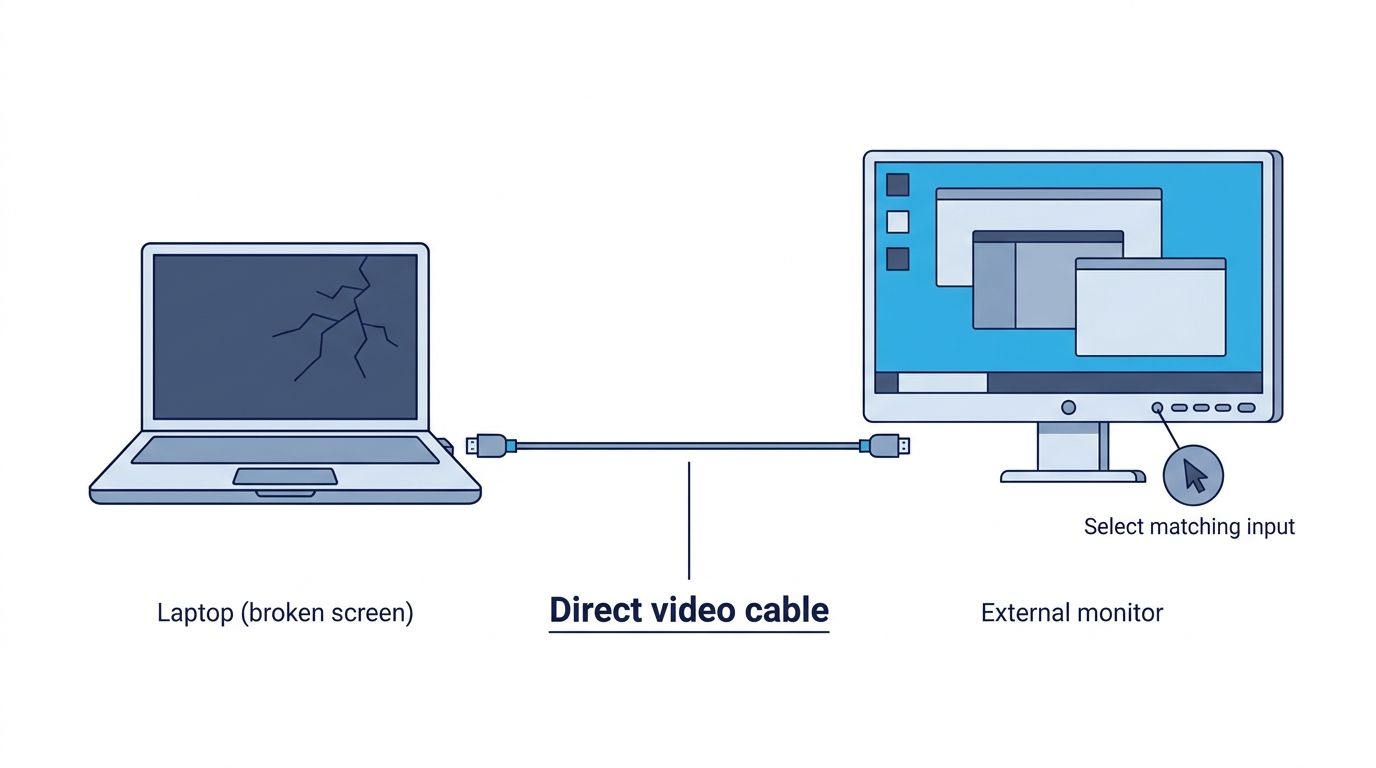
You do not need to remove the damaged panel to try this. Start with the simplest setup: connect a video output on the laptop directly to the matching input on a monitor or TV. If the built-in screen is completely black, turn on the external display and select its input before starting the laptop.
Which display should you use?
A monitor or TV can both give you a picture from the laptop. Start with the display, cable, and port combination you already know works, with as few adapters or docks as possible.
What you have
- Can it work?
- Usually, if the laptop has a compatible video output
- Best use
- Best for text-heavy work and a desk setup
- Key limitation
- Needs power and the correct input
What you have
- Can it work?
- Often, usually through HDMI
- Best use
- Useful when you do not have a monitor
- Key limitation
- Input selection, scaling, audio, and picture settings vary by TV
What you have
- Can it work?
- Usually not through HDMI
- Best use
- Wireless Display or a capture device in some setups
- Key limitation
- Most laptop HDMI ports send video out; they do not receive it
What you have
- Can it work?
- Sometimes
- Best use
- A desk setup after a direct connection works
- Key limitation
- Adds more parts that can fail or need to be configured
Swipe table to view all columns.Scroll table to view all columns.
| What you have | Can it work? | Best use | Key limitation |
|---|---|---|---|
| Computer monitor | Usually, if the laptop has a compatible video output | Best for text-heavy work and a desk setup | Needs power and the correct input |
| TV | Often, usually through HDMI | Useful when you do not have a monitor | Input selection, scaling, audio, and picture settings vary by TV |
| Another laptop | Usually not through HDMI | Wireless Display or a capture device in some setups | Most laptop HDMI ports send video out; they do not receive it |
| Dock or hub | Sometimes | A desk setup after a direct connection works | Adds more parts that can fail or need to be configured |
When a TV is the display you have
Connect the laptop to one of the TV’s HDMI ports, turn the TV on, and select that same HDMI input. If the picture is cropped or text is hard to read, look for a setting such as PC mode, Screen Fit, Just Scan, or Fit to Screen. The name varies by TV. Once you can see and control the desktop, adjust the display resolution or scaling if needed. Audio may also travel over HDMI or DisplayPort, but video and audio are separate checks.
A TV can work well for this temporary setup. Text size, cropping, audio, and response time depend on the TV and its picture settings.
If you only have another laptop
An HDMI cable usually cannot turn another laptop into a monitor. Most laptop HDMI ports send video out; they do not receive video from another laptop. Wireless Display or a capture device can work in some setups, but both require extra preparation and are poor first choices when you cannot see the source laptop’s screen. A monitor or TV is usually the simplest option.
Connect the laptop directly to the display
For the first test, use one cable between the laptop and the monitor or TV. Docks, hubs, adapters, and wireless connections add more places for the setup to fail, so leave them out if you can.
- Turn on the monitor or TV and select the input where you connected the cable, such as HDMI 1, HDMI 2, DisplayPort, or USB-C.
- Connect the laptop directly to the display. HDMI-to-HDMI is simplest when both devices have it. Use USB-C, DisplayPort, or an adapter only when both devices support that type of video connection.
- Turn on the laptop or wake it from sleep, then wait a few seconds. Some laptops do not show the picture until they finish starting or wake from sleep.
- If the monitor or TV is on but you cannot see the laptop’s picture, check the Windows, Mac, or Chromebook instructions below. If it says No signal, follow the No signal steps instead of swapping many parts at once.
- Once you can see the desktop reliably, back up important files before doing anything else.
If the built-in screen is completely black
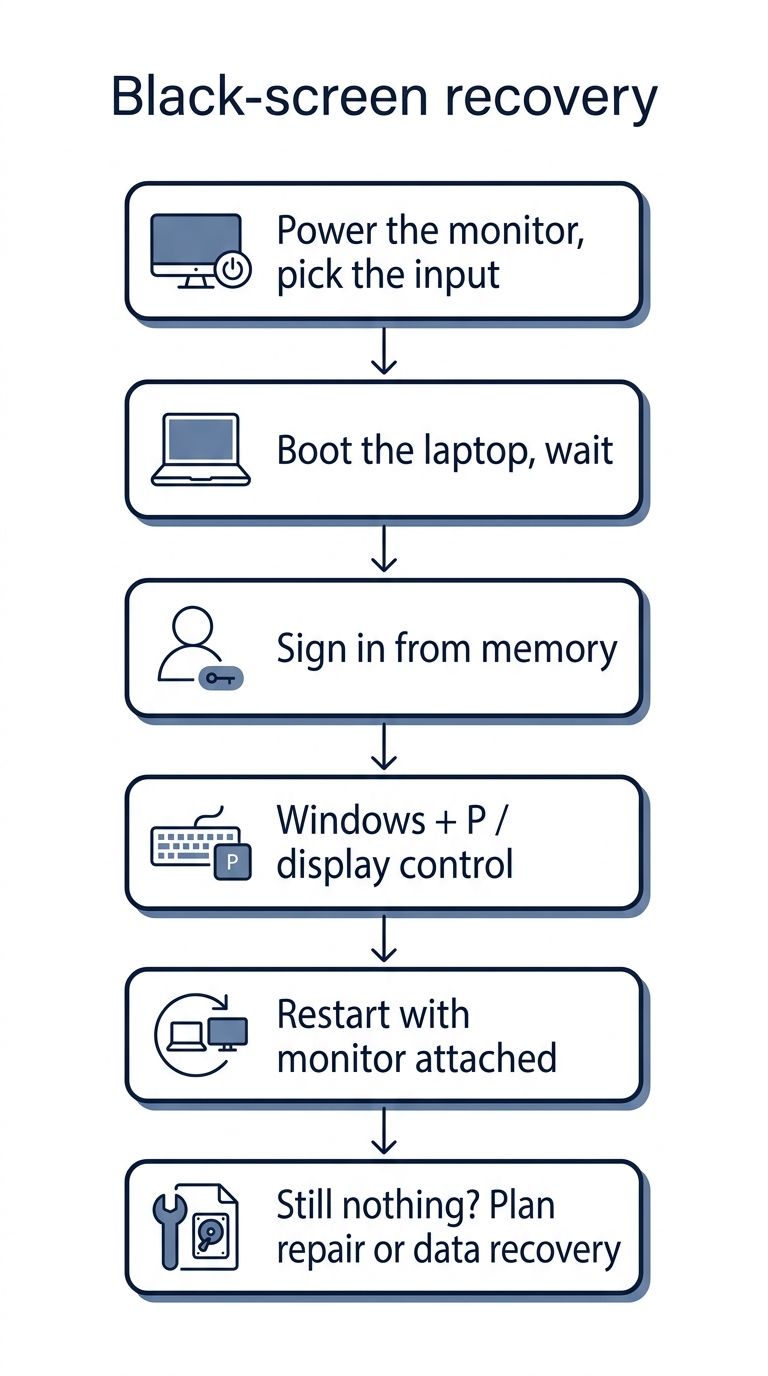
A completely black screen is harder because you cannot see whether the laptop has reached the sign-in screen or desktop. The external display may not show anything until the operating system has finished starting. Even then, some startup, recovery, or security screens may still appear only on the built-in display.
Windows: switch displays when you cannot see anything
- Power the external display first and select its input before starting or waking the laptop.
- Wait for the Windows sign-in screen. If you know the normal sign-in sequence and can enter your PIN or password without seeing the screen, sign in. Otherwise, avoid guessing.
- Press Windows + P to open the projection selector. Choose Duplicate when you need the same picture on both screens, or Second screen only once the external display is confirmed.
- If Windows appears to be running but the external display is still blank, press Windows + Ctrl + Shift + B once. This restarts the graphics driver and may make the display appear again. It will not repair a damaged screen.
- A laptop’s Fn display key may help, but the key varies by manufacturer, keyboard mode, and model. Look for a monitor icon rather than assuming a particular F-key.
Do not rely on a fixed “press Down three times” recipe. The active mode, menu focus, Windows version, lock state, and manufacturer settings can change what the same key presses do. If you cannot see the menu, Windows + P may not be enough to complete the switch reliably. Avoid changing BIOS or startup settings when you cannot see what you are selecting.
MacBook: connect first, then configure what you can see
The exact steps depend on the Mac model, its ports, and the cable or adapter you use. Connect the display to power and use a compatible Thunderbolt, USB-C, or HDMI connection where available. A compatible display may appear automatically once it is connected and powered on. If you cannot see any display, do not rely on navigating System Settings from memory as your first step. Use System Settings > Displays after a picture appears.
Chromebook: mirror before extending
Chromebooks can connect to supported monitors or TVs through HDMI, DisplayPort, USB-C, DVI, or VGA depending on the device and adapter. If you can reach display settings, mirror the built-in display first so windows do not remain on a screen you cannot see. On supported Chromebooks, press the screen-brightness-down key until the built-in screen turns off while you keep working on the external display.
Choose the right cable or port
The shape of a connector does not always tell you whether it can carry video. The laptop port, cable, adapter, and monitor or TV input all need to support the same connection.
Laptop connection
- Display connection
- HDMI input on monitor or TV
- What to check
- Use a known-good HDMI cable and select the matching display input.
Laptop connection
- Display connection
- DisplayPort input or compatible adapter
- What to check
- Make sure the adapter carries video from the laptop to the display.
Laptop connection
- Display connection
- USB-C, DisplayPort, or HDMI display input
- What to check
- The specific port must support DisplayPort Alt Mode, Thunderbolt, or USB4 display output.
Laptop connection
- Display connection
- Thunderbolt, USB-C, DisplayPort, or HDMI through a compatible adapter
- What to check
- The laptop, cable, adapter, and display must all support the connection.
Laptop connection
- Display connection
- Not normally a display input
- What to check
- Do not expect HDMI laptop-to-laptop to work without a special receiving method.
Swipe table to view all columns.Scroll table to view all columns.
| Laptop connection | Display connection | What to check |
|---|---|---|
| HDMI output | HDMI input on monitor or TV | Use a known-good HDMI cable and select the matching display input. |
| DisplayPort or Mini DisplayPort output | DisplayPort input or compatible adapter | Make sure the adapter carries video from the laptop to the display. |
| USB-C port that supports video | USB-C, DisplayPort, or HDMI display input | The specific port must support DisplayPort Alt Mode, Thunderbolt, or USB4 display output. |
| Thunderbolt output | Thunderbolt, USB-C, DisplayPort, or HDMI through a compatible adapter | The laptop, cable, adapter, and display must all support the connection. |
| Another laptop HDMI port | Not normally a display input | Do not expect HDMI laptop-to-laptop to work without a special receiving method. |
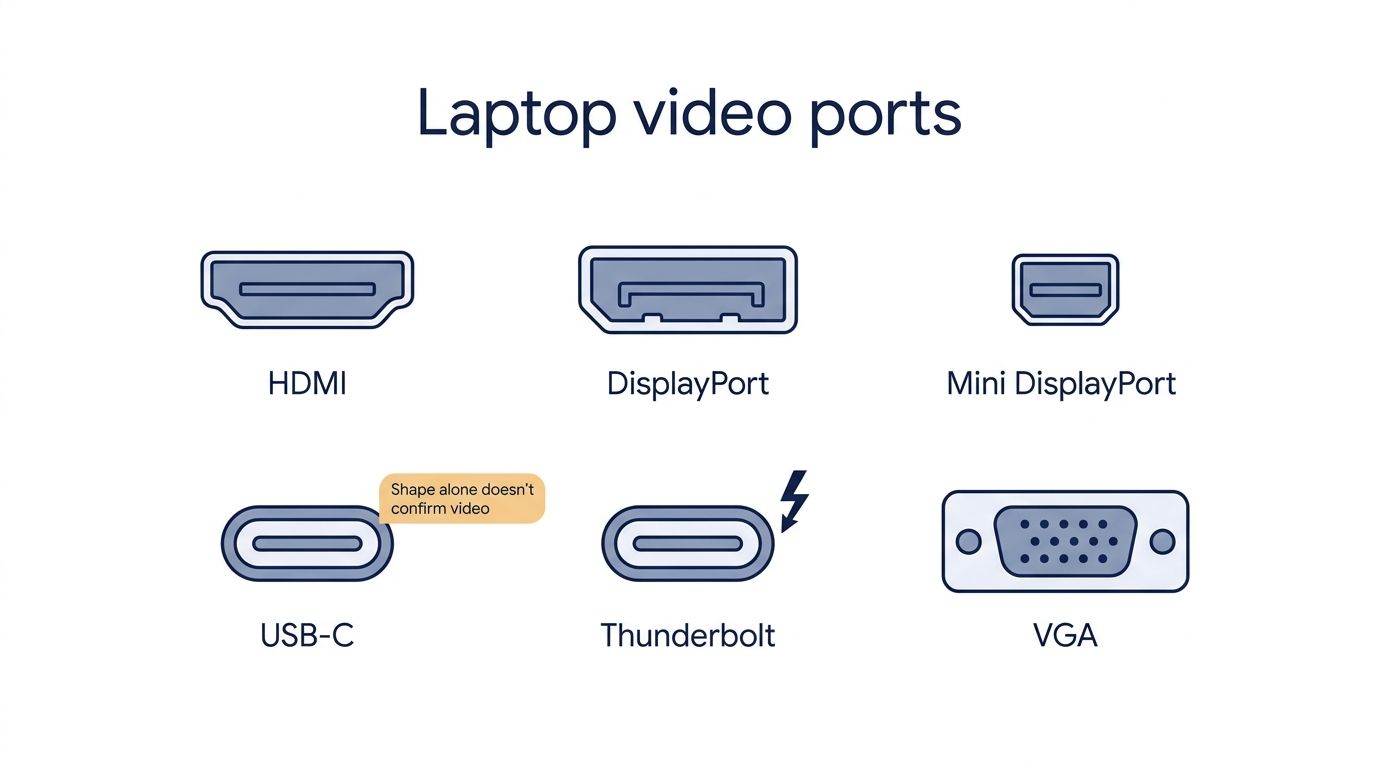
- A USB-C port that supports charging or data only cannot send a picture to a monitor.
- A charging-only or USB 2.0 cable may not carry the video standard your display needs.
- USB-A display adapters often rely on software and may not work before login, during recovery, or when the internal screen is unreadable.
- VGA can work on older equipment, but it is analog and does not carry audio.
Switch the laptop to the external display
Once the monitor or TV shows the laptop, choose whether to mirror both screens or use the external display by itself.
Mode
- What it does
- Shows the same picture on both displays.
- Best use here
- Best while the built-in screen is partly visible or you need to confirm the external picture.
Mode
- What it does
- Creates one desktop across both displays.
- Best use here
- Useful later, but windows or a login prompt can remain on the unreadable screen.
Mode
- What it does
- Uses the external display as the working screen.
- Best use here
- Usually the cleanest mode after the external picture is confirmed.
Swipe table to view all columns.Scroll table to view all columns.
| Mode | What it does | Best use here |
|---|---|---|
| Mirror / Duplicate | Shows the same picture on both displays. | Best while the built-in screen is partly visible or you need to confirm the external picture. |
| Extend | Creates one desktop across both displays. | Useful later, but windows or a login prompt can remain on the unreadable screen. |
| External display only | Uses the external display as the working screen. | Usually the cleanest mode after the external picture is confirmed. |
Why the monitor or TV says No signal
If the monitor or TV says No signal, it is on but is not detecting a picture from the laptop. That does not prove the graphics hardware has failed. Test one thing at a time so you know what fixed the problem.
- Confirm the display is powered and set to the exact input used by the laptop.
- Reseat both ends of the cable. Then try one cable you know works with another device.
- Bypass the dock or hub and test the laptop directly into the monitor or TV.
- If you are using USB-C, check that the laptop port supports video. If you are using an adapter, make sure it converts the laptop’s output to the input on the monitor or TV; some adapters only work in one direction.
- Try another native video-output port or another known-good display if you have one.
- Wait until the laptop reaches the sign-in screen or desktop. Some systems do not show external video until the operating system has finished starting.
- Use the correct display-mode control for Windows, macOS, or ChromeOS.
- Restart once with the display powered and connected. If one known-good direct connection still produces no signal, stop buying more adapters and consider repair or data recovery.
What the external display test tells you
What appears on the external display can narrow down the problem, but it cannot identify the failed part by itself.
External result
- What it supports
- The laptop is sending video somewhere, so the built-in screen or its connection becomes more likely to be the main problem.
- What it does not prove
- It does not prove the panel alone is the failed component or that the motherboard is healthy.
- Next step
- Back up, document the damage, and plan repair or replacement.
External result
- What it supports
- The problem may be somewhere the two displays share, such as the graphics system, motherboard, software, or a cable connection.
- What it does not prove
- It does not prove GPU, motherboard, or driver failure; the cable, adapter, display, and software state still matter.
- Next step
- Test one known-good direct connection, then seek a repair assessment if the pattern remains.
External result
- What it supports
- The problem may be the input, cable, adapter, port, startup state, display mode, or the laptop itself.
- What it does not prove
- It does not prove GPU failure or that the built-in panel caused the problem.
- Next step
- Follow the No signal checks, then stop after a known-good connection fails.
External result
- What it supports
- The display is receiving a signal, even though the picture is not usable.
- What it does not prove
- It does not identify whether the cause is the sign-in screen, display mode, brightness, driver, or hardware.
- Next step
- Check the platform display-mode and graphics-reset steps before deciding whether the laptop needs repair.
External result
- What it supports
- Hinge, cable, port, or structural instability is plausible.
- What it does not prove
- It does not identify the exact failed component.
- Next step
- Move the lid as little as possible, back up, and plan repair.
Swipe table to view all columns.Scroll table to view all columns.
| External result | What it supports | What it does not prove | Next step |
|---|---|---|---|
| External display works normally; built-in screen remains damaged | The laptop is sending video somewhere, so the built-in screen or its connection becomes more likely to be the main problem. | It does not prove the panel alone is the failed component or that the motherboard is healthy. | Back up, document the damage, and plan repair or replacement. |
| The same lines, flicker, or corruption appear externally | The problem may be somewhere the two displays share, such as the graphics system, motherboard, software, or a cable connection. | It does not prove GPU, motherboard, or driver failure; the cable, adapter, display, and software state still matter. | Test one known-good direct connection, then seek a repair assessment if the pattern remains. |
| External display says No signal | The problem may be the input, cable, adapter, port, startup state, display mode, or the laptop itself. | It does not prove GPU failure or that the built-in panel caused the problem. | Follow the No signal checks, then stop after a known-good connection fails. |
| External display is on but the picture is black | The display is receiving a signal, even though the picture is not usable. | It does not identify whether the cause is the sign-in screen, display mode, brightness, driver, or hardware. | Check the platform display-mode and graphics-reset steps before deciding whether the laptop needs repair. |
| External display works only at one lid angle | Hinge, cable, port, or structural instability is plausible. | It does not identify the exact failed component. | Move the lid as little as possible, back up, and plan repair. |
Can you keep using the laptop this way?
You may be able to keep using the laptop with an external display as a desktop setup. You will lose portability, and the webcam, microphone, lid behavior, sleep settings, and startup or recovery screens may not work as they did before. If the hinge or screen changes with movement, do not keep flexing it to improve the picture. An external display can keep the laptop useful while you decide what to do, but it does not repair the underlying damage.
Do you need to remove the broken screen?
You usually do not need to remove the built-in screen to use an external monitor or TV. Removing the screen or disconnecting its cable is a model-specific repair and can affect the webcam, microphones, Wi-Fi antennas, lid sensors, hinges, or other wiring. Do not remove the screen just to try to force external output.
Once the display works, protect your files
If you want help protecting or moving those files, see our guided computer backup and data transfer service.
- Document the built-in display if warranty, insurance, school IT, or repair evidence may matter.
- You can keep using the external display for a while if the laptop is not overheating, shutting down, swelling, or becoming more damaged.
- Compare repair and replacement when portability, hinge integrity, battery condition, age, or the repair quote changes the decision.
- If the laptop is wet, swollen, overheating, or repeatedly shutting down, stop using it. Follow the water-damage or repair guidance before trying more display tests. If neither the built-in nor external display works, consider repair or data recovery.
Use document damage for warranty if support or insurance is involved, or compare repair vs replace if the repair quote may be high.
These tests can narrow down the problem, but they cannot identify the failed internal component from a distance.
Common questions
Can I use another laptop as the display?
Usually not with an HDMI cable because most laptop HDMI ports send video out rather than receive it. Wireless Display or a capture device can work in some setups, but a monitor or TV is usually simpler when the source screen is unreadable.
Can I make the laptop boot to the external display every time?
Sometimes, but no universal setting guarantees that every startup, recovery, or security screen will appear on the external display. Those screens depend on the laptop model, port, firmware, cable, and adapter.
Can I turn the old laptop LCD into a separate monitor?
That is a different project. This guide covers using the laptop through a monitor or TV. A detached laptop LCD needs a model-specific controller board and wiring.
Related guides
Use this when the external display works but the built-in panel still needs a repair decision.
Compare this when the laptop is older, structurally damaged, or the repair quote may be high.
Capture evidence while the laptop is accessible and before the visible pattern changes.
Use this when the display changed after a squeeze, lid pressure, bag compression, or flex event.
Stop powering the laptop and use this route first when liquid exposure may be involved.
Sources
- Troubleshoot external monitor connections in Windows
Microsoft Support · Cable, input, display-mode, dock, and Windows + Ctrl + Shift + B troubleshooting.
- Troubleshooting blank screens in Windows
Microsoft Support · Windows + P and graphics-driver reset context for blank display states.
- Screen mirroring and projecting to your PC or wireless display
Microsoft Support · Conditional Wireless Display and Projecting to this PC guidance.
- Connect displays to your Mac
Apple Support · Supported display connections, ports, cables, adapters, model limits, and detection.
- Extend or mirror your Mac desktop across multiple displays
Apple Support · Mac display arrangement, mirroring, primary display, and closed-display context.
- Connect your Chromebook to a monitor
Chromebook Help · Chromebook monitor/TV connection, mirroring, and external-only display controls.
- How ScreenDetect Works
ScreenDetect · ScreenDetect’s evidence-first approach and claim boundaries.