
First check: image, touch, and brightness
Cracked glass is the visible surface break. Internal screen damage is more likely when the image, touch response, brightness, OLED/LCD panel, backlight, or display connection also changes.
If the image, brightness, and touch all look normal and stay stable, the damage may be limited to the outer glass. If you see black spots, ink-like marks, fixed lines, flicker, dead touch zones, spreading discoloration, or no image while the device still powers on, treat it as likely more than glass.
Do not press around the crack, flex the device, heat or cool it, or keep running tests after the symptom worsens. Compare the visible symptom, protect access if the screen is unstable, and let the manufacturer, retailer, or repair provider inspect it when coverage or repair scope matters.
Decide these before repair
- Did only the outer glass crack, or did image, touch, brightness, or screen stability change too?
- Is the symptom stable enough for a controlled browser check, or should backup and documentation come first?
- Which symptom owns the next step: black spots, lines, dead touch, no image, pressure, or water?
- Which official support, repair, return, warranty, or insurance terms need to be checked before you approve work?
Start with what changed
The crack tells you the surface broke. It does not tell you whether the display underneath survived. Use the symptom that appeared after the crack, drop, squeeze, bend, pressure event, or liquid exposure.
What changed after the crack or event
- What it usually points toward
- Possible glass-only damage
- What to do now
- Monitor for change and decide whether repair timing, trade-in value, or sharp glass risk matters.
What changed after the crack or event
- What it usually points toward
- Likely display-layer damage
- What to do now
- Open dark spots on a screen and document the current state if support may matter.
What changed after the crack or event
- What it usually points toward
- Likely panel or display-path damage
- What to do now
- Open lines after pressure if force, pressure, bending, or a bag squeeze came first.
What changed after the crack or event
- What it usually points toward
- Touch layer, digitizer, connector, or display assembly may be involved
- What to do now
- Back up while touch still works, then open touch dead zones.
What changed after the crack or event
- What it usually points toward
- Severe display-path failure or panel failure
- What to do now
- Protect access first. Use external-display or backup routes before more diagnosis.
What changed after the crack or event
- What it usually points toward
- The screen is not stable
- What to do now
- Take brief documentation, back up what matters, and stop treating it as a simple cosmetic crack.
Swipe table to view all columns.Scroll table to view all columns.
| What changed after the crack or event | What it usually points toward | What to do now |
|---|---|---|
| Image looks normal, brightness is stable, and touch works everywhere | Possible glass-only damage | Monitor for change and decide whether repair timing, trade-in value, or sharp glass risk matters. |
| Black spot, ink-like blotch, bruise, dark patch, or spreading mark | Likely display-layer damage | Open dark spots on a screen and document the current state if support may matter. |
| Fixed vertical lines, horizontal lines, colored bands, flicker, or partial blackout | Likely panel or display-path damage | Open lines after pressure if force, pressure, bending, or a bag squeeze came first. |
| Touch fails in one area, taps by itself, or misses input | Touch layer, digitizer, connector, or display assembly may be involved | Back up while touch still works, then open touch dead zones. |
| Device vibrates, rings, charges, or connects but the screen is black or unreadable | Severe display-path failure or panel failure | Protect access first. Use external-display or backup routes before more diagnosis. |
| Symptom is spreading or changes over hours or days | The screen is not stable | Take brief documentation, back up what matters, and stop treating it as a simple cosmetic crack. |
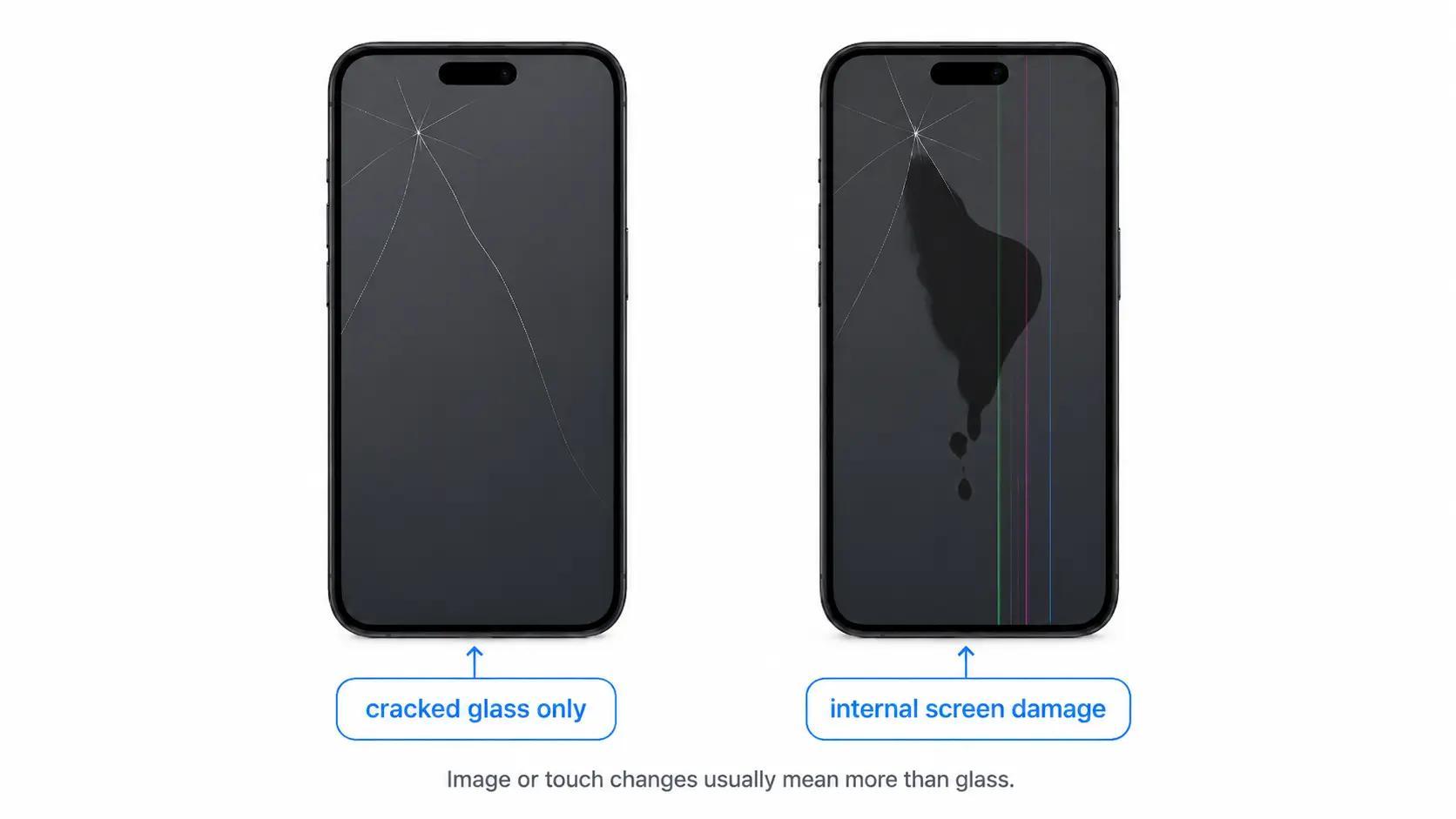
Why the crack alone is not enough
Modern screens are repaired and evaluated as device-specific assemblies, not as one universal sheet of glass. Apple says iPhone screen service needs inspection for a personalized estimate, and its display guidance separates display quality, Multi-Touch behavior, brightness, and repair-part issues. Samsung distinguishes front screen repair from screen module replacement and notes that bent frames, battery swelling, or other hardware failures can change service eligibility. Google tells Pixel owners that repair partners inspect devices, may find additional damage, and may update charges before repair begins.
That source material matters because none of those pages lets a reader classify damage by looking at the crack alone. They explain service paths, estimates, parts, and inspection. The practical translation is narrower: a normal-looking crack plus normal image and touch is different from a crack plus black spots, lines, touch loss, flicker, or no image.
What those sources do not prove: they do not confirm your exact failed layer, decide your coverage, or guarantee a glass-only repair from a photo. They point you toward the right evidence to collect and the right questions to ask before you approve service.
Check in this order
- Stop any risky handling first. Do not push on the panel or flex the device to see whether the image changes.
- If the screen is readable and stable, look at a plain white, black, gray, and solid-color screen. A controlled browser test such as screen color test can make fixed spots, bands, discoloration, or missing areas easier to see.
- If the issue is a single dot, use pixel test. If the mark is a larger bruise, patch, spreading blotch, line cluster, or dead area, treat it as damage rather than a pixel-only issue.
- If touch is the problem, use touch screen test only while the device is stable enough to control. If touch blocks unlock, backup, or prompts, stop testing and protect access.
- Take one clear photo or a short video if return, warranty, insurance, school IT, work IT, repair, or trade-in review may matter.
The controlled test does not repair physical damage. Its job is to make the symptom easier to describe: fixed line, spreading dark patch, dead touch area, no image, or glass-only crack with normal function.
When access comes before diagnosis
If the screen is changing, the next useful move may be backup or documentation, not one more test.
- Phone touch is failing, random, or blocking unlock: use back up a phone with a broken display while you still have enough control.
- Laptop display is unreadable but the computer still runs: use a laptop with an external monitor before the built-in screen becomes your only failure point.
- The symptom is visible now and may change before support sees it: use document damage for warranty and keep the record short and factual.
- Water, rain, condensation, or wet storage was involved: use water damage. The repair question may involve more than the screen.
What to ask repair or support
Ask questions that separate the visible crack from the repair scope:
- Which part is being replaced: front screen, outer glass, display panel, touch layer, display assembly, frame, battery, or module?
- Does the quote cover the symptom I see, or only the cracked surface?
- Could inspection change the quote because of water exposure, a bent frame, battery swelling, connector damage, or another hardware failure?
- Do I need to back up, remove a SIM, enable repair mode, factory reset, or provide a passcode before service?
- What repair warranty or service guarantee covers the replacement part and labor?
- If warranty, return, insurance, or trade-in value matters, what evidence should I keep before sending the device in?
Apple, Samsung, Google, retailers, and repair partners can change service options, eligibility, costs, and part availability by model, location, and inspection result. Check current terms before you approve repair.
Use the right next page
Choose the next route by the strongest clue, not by the crack itself.
- If the screen can be repaired is the main question: Can a broken display be repaired?
- If the quote may be too high: Repair vs replace
- If the main clue is a black spot or spreading dark patch: Dark spots on a screen
- If the main clue is lines or flicker after force or pressure: Lines after pressure
- If touch stopped working in part of the screen: Touch dead zones
- If a squeeze, bend, compression, bag pressure, or drop came first: Pressure damage
- If liquid may be involved: Water damage
What a browser check can and cannot tell you
A browser check can help you describe what is visible: the spot is fixed, the line stays in the same place, touch fails in the lower-right corner, the screen is readable only at certain brightness levels, or the damage is spreading.
It cannot inspect the panel, see under the glass, confirm the exact failed layer, quote repair, decide warranty coverage, or make physical damage disappear. If the screen is unstable, save access and documentation before trying to prove the exact layer that failed.
Common questions
How do I know if it is just cracked glass?
It may be glass-only if the image looks normal, touch works everywhere, brightness is stable, and the damage is not spreading. That still does not replace inspection if repair, warranty, return, insurance, or trade-in value matters.
What are signs of internal screen damage?
Black spots, ink-like blotches, fixed lines, flicker, discoloration, dead touch zones, ghost touch, partial black areas, or no image usually mean the problem goes beyond the outer glass.
Can a cracked screen still work with internal damage?
Yes. A damaged screen can still light up and respond while part of the display panel, touch layer, connector, or display assembly is already compromised.
What if the cracked screen has black spots?
Black spots, dark patches, or ink-like marks usually point toward display-layer damage under the glass, especially if they appeared after the crack or keep spreading.
What if the cracked screen has lines?
Fixed vertical, horizontal, colored, or flickering lines after a crack, drop, squeeze, bend, or pressure event usually move the problem toward panel or display-path damage, not only surface glass.
What if touch stopped working after the crack?
Touch failure usually means the touch layer, digitizer, connector, or display assembly may be involved. Back up first if touch is still good enough to unlock or approve prompts.
Should I keep using a screen that is only cracked?
Temporary use may be possible if image, touch, and brightness are normal and stable. Stop treating it as stable if cracks spread, glass sheds, lines appear, dark spots grow, flicker starts, or touch becomes unreliable.
Can internal screen damage be repaired?
Often, but the repair may involve a display panel, touch layer, front screen, or full display assembly rather than only the outer glass. The provider decides the repair scope after inspection.
Should I document the damage before repair or warranty support?
Yes if support, return, school IT, work IT, warranty, insurance, or trade-in value may matter. Take one clear photo or short video while the symptom is visible and note what happened before it appeared.
What to do next
Use this after the damage looks internal, mixed, or severe and the next question is repairability.
Use this when a quote, device age, device value, or replacement cost changes the decision.
Use this when touch or visibility may block access before repair.
Use this when a laptop still runs but the built-in display is unreliable.
Use this when visible evidence may matter before the screen changes again.
Use this when the strongest clue is a black spot, bruise, blotch, or spreading dark patch.
Use this when cracks are paired with fixed vertical, horizontal, colored, or flickering lines.
Use this when part of the touchscreen stopped responding after damage.
Use this when pressure, squeeze, bend, compression, or a drop changed the display.
Use this when spill, rain, condensation, wet storage, or liquid exposure may be involved.
Sources
- Apple Service and Repair for iPhone Screens
Apple Support · Checked June 3, 2026. Apple states that inspection is needed for a personalized estimate and that screen service options depend on coverage and provider.
- About genuine iPhone displays
Apple Support · Checked June 3, 2026. Used for careful wording around display performance, touch behavior, trained repair, and genuine display parts.
- Cracked Screen Repair
Samsung Support · Checked June 3, 2026. Samsung distinguishes screen repair from screen module replacement and notes inspection constraints such as bent frames or other hardware failures.
- Get your device repaired
Google Pixel Help · Checked June 3, 2026. Google tells Pixel owners to select all damages, back up data before repair, and expect inspection before final repair cost.
- Understand repair charges and payments
Google Pixel Help · Checked June 3, 2026. Google explains that cracked screens, cosmetic damage, liquid damage, and internal damage can affect warranty and repair charges.
- Warranties
Federal Trade Commission · Checked June 3, 2026. Used for the practical advice to keep warranty and receipt records and read coverage limits before relying on warranty language.