
If a dark blotch, bruise-like patch, bright spot, colored lines, or crack-like mark appeared after something pressed against your laptop screen, the display may have been physically damaged. Common causes include a packed bag, a tight sleeve, an object left on the keyboard when the lid closed, or stress near the hinge.
Do not press the mark, rub it, or try to heat it away. While the laptop still works, check the mark against a few plain backgrounds, take a photo, and back up important files. If the mark is spreading or the screen is becoming hard to read, use an external monitor if possible and have the laptop inspected.
What laptop screen pressure damage can look like
The pattern matters, but so does what happened before it appeared. Smooth glass or plastic on the outside does not rule out damage underneath.
- A dark blotch or bruise-like patch that stays in the same place across plain backgrounds
- A bright fixed spot after a small object or raised edge pressed against the screen
- Colored, purple, vertical, or horizontal lines that appeared after pressure or a closed-lid object
- An ink-like or crack-like shape beneath a surface that still feels smooth
- A mark that grows, spreads, or changes after another pressure event
What you see
- What it may mean
- Pressure may have damaged the screen layers underneath
What you see
- What it may mean
- A small area of the screen may have been pressed or damaged
What you see
- What it may mean
- The screen, display cable, or hinge area may be affected
What you see
- What it may mean
- Damage may be below the outer surface
What you see
- What it may mean
- The damage may be worsening and should be documented
Swipe table to view all columns.Scroll table to view all columns.
| What you see | What it may mean |
|---|---|
| Dark blotch or bruise-like patch | Pressure may have damaged the screen layers underneath |
| Bright fixed spot | A small area of the screen may have been pressed or damaged |
| Colored line cluster | The screen, display cable, or hinge area may be affected |
| Crack-like mark beneath smooth glass or plastic | Damage may be below the outer surface |
| Mark that becomes larger over time | The damage may be worsening and should be documented |
A single tiny dot points to a different problem than a broad blotch or cluster of lines. If the problem appears only in one app or disappears from a screenshot, do not assume the laptop screen itself is damaged.
What happened before the mark appeared?
Think about the last day or two. A pressure mark often makes more sense when you connect it to how the laptop was closed, carried, or stored.
- A backpack, work bag, or sleeve packed tightly around the laptop
- A book, charger, water bottle, another laptop, or other heavy object pressing on the closed lid
- A pen, cable, earbud, charger tip, stylus, crumb, or debris left on the keyboard
- A drop, bent lid, or impact near the hinge
- A touch-screen or 2-in-1 laptop closing while something was between the screen and keyboard
- A laptop chassis or hinge that flexed during travel or handling
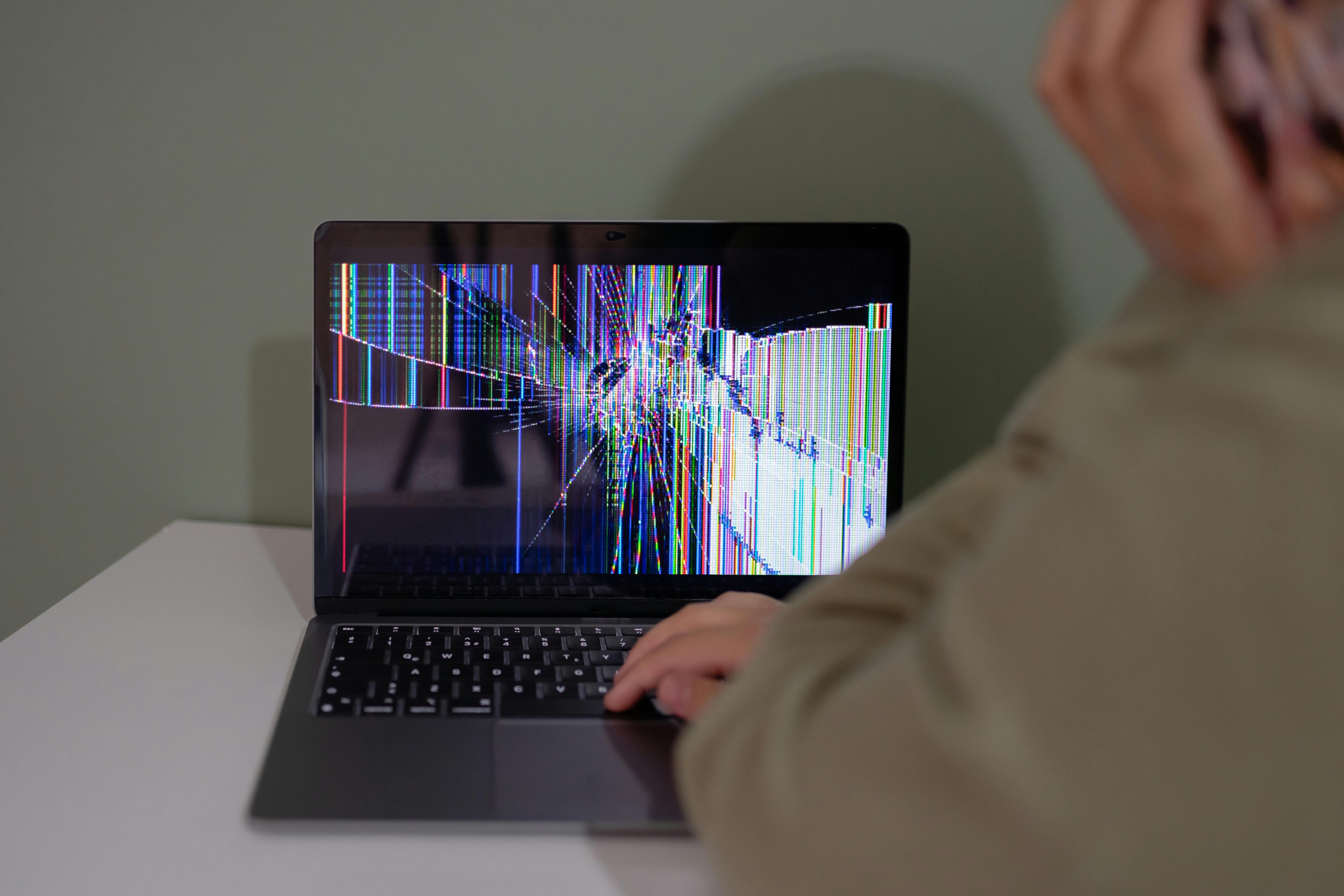
A recent pressure event makes physical screen damage more plausible, but it does not identify the failed part or decide whether the manufacturer will cover the repair.
How to check the mark safely
These checks can help narrow down the problem, but they cannot repair the screen. Skip anything that requires pressing, squeezing, heating, cooling, or repeatedly flexing the lid.
Safe laptop screen checks
Step 1
Compare plain backgrounds
Use full-screen white, black, and gray backgrounds. If the mark stays in the same place on every background, the problem is more likely to be in the laptop display than in one app or image. Add red, green, or blue backgrounds if you need to see whether the mark changes color.
Step 2
Clean the surface gently
Follow the laptop manufacturer’s cleaning instructions. If the mark wipes away or changes after gentle cleaning, it may be residue, a smudge, a protector mark, or surface contamination. Do not rub harder to force a change.
Step 3
Compare a screenshot
Take a screenshot and view it on another device if possible. A screenshot captures the image coming from the computer, not a physical mark that exists only on the screen. If the mark does not appear in the screenshot, the laptop display itself becomes the more likely source. If it appears in the screenshot, investigate software, graphics, or the image being rendered.
Step 4
Compare an external monitor
Connect a known-good external monitor. If it looks normal while the laptop screen still shows the mark, the laptop display, display cable, or hinge area becomes more likely. If the same problem appears on the external monitor, look beyond the laptop screen to software, graphics, or output connections.
Step 5
Move the lid normally once
Open the lid to a normal working angle and leave it there. If ordinary movement causes flicker, blackouts, color changes, or new lines, stop testing and protect your files instead of flexing the lid again.
A normal screenshot or external monitor does not prove which individual part failed. It helps show whether the problem stays with the laptop screen or appears wherever the computer sends the image.
Pressure damage or another screen problem?
Use the visible pattern to decide what to check next, but do not treat it as a final hardware diagnosis.
What you see
- What to check next
- Run the Pixel Test before assuming pressure caused it
What you see
- What to check next
- Compare it with backlight bleed or panel-uniformity behavior
What you see
- What to check next
- Consider image retention or burn-in
What you see
- What to check next
- Stop flexing the lid and have the screen, cable, and hinge area inspected
What you see
- What to check next
- Look beyond the laptop screen to software, graphics, or output connections
What you see
- What to check next
- Consider surface residue or contamination
What you see
- What to check next
- Stop using the laptop and follow the water-damage guidance before trying more tests
Swipe table to view all columns.Scroll table to view all columns.
| What you see | What to check next |
|---|---|
| One tiny black, white, red, green, or blue dot | Run the Pixel Test before assuming pressure caused it |
| Edge or corner glow on a dark screen | Compare it with backlight bleed or panel-uniformity behavior |
| Faint logo, taskbar, browser bar, or app shape | Consider image retention or burn-in |
| Lines or flicker that change when the lid moves | Stop flexing the lid and have the screen, cable, and hinge area inspected |
| The same problem appears in screenshots or on an external monitor | Look beyond the laptop screen to software, graphics, or output connections |
| The mark changes or disappears after gentle cleaning | Consider surface residue or contamination |
| Moisture or corrosion is visible | Stop using the laptop and follow the water-damage guidance before trying more tests |
If the main problem is a black blotch or dark patch, compare it with the dark-spots guide.
If lines are the main problem, start with the guide to screen lines.
If the image looks cracked beneath a smooth surface, see how internal screen damage differs from cracked glass.
Do not try to remove a pressure mark by pressing or heating it
A pressure mark is not something you should massage, heat, chill, or press out. Those methods can put more stress on the screen and do not restore damaged screen layers. If the mark stays fixed after cleaning and plain-background checks, document it and move to a repair or replacement decision.
When to stop relying on the laptop screen
- The dark area is spreading
- New lines appear during normal use
- The screen flickers or blacks out
- Moving the lid changes the picture
- The screen is becoming difficult to read
- The lid or hinge is bent
- Moisture or corrosion is visible
Back up important files while the laptop is still usable. If the external monitor works, use it to finish the backup or move urgent work away from the damaged screen.
What to document before contacting support
Take your photos and notes while the problem is still visible. A repair provider still needs to inspect the laptop, but clear records make it easier to explain what happened and whether the problem has changed.
- The exact laptop brand and model
- The date the mark appeared
- What was in the bag or on the keyboard
- Whether the lid closed on anything
- Whether cleaning changed the mark
- What appears on white, black, and gray backgrounds
- Whether the mark appears in a screenshot
- Whether an external monitor looks normal
- Whether moving the lid changes the symptom
- Clear photos of the screen and exterior
If you need a short checklist, use our guide to documenting damage before service.
Can laptop screen pressure damage be repaired?
Software cannot repair a physically damaged laptop screen. A repair provider may replace the screen assembly, display cable, or another related part after inspection. The exact repair depends on the laptop model and what the inspection finds.
If the estimate is high or the laptop is older, compare the cost of repair with replacement. Consider the laptop’s age, current value, battery condition, hinge condition, panel type, touch layer, and availability of replacement parts.
Brand, warranty, and managed-device differences
Manufacturer warranties and accidental-damage plans do not all use the same rules. A basic warranty may not cover pressure or impact damage, while an accidental-damage plan may cover it under its own terms. Check the exact plan before using an outside repair provider.
Dell’s U.S. support guidance includes examples of pressure-related LCD surface damage, black spots, internal cracks, and vertical lines. Read Dell’s damage examples for the manufacturer’s visual examples.
If the laptop belongs to a school or is personally managed through work, contact the school or employer’s support contact before opening it or using an outside shop. The device may have a repair, loaner, or accidental-damage process that you need to follow.
Chromebook, gaming, OLED, and touch-laptop considerations
The repair decision can change depending on the type of laptop. A screen replacement may be reasonable on a newer premium, gaming, OLED, touch-screen, or 2-in-1 laptop. It may be harder to justify on an older Chromebook or budget laptop when the repair cost approaches the value of a comparable replacement.
Get a quote first. Compare it with the laptop’s age, battery condition, hinge condition, storage needs, and current price before approving the repair.
Choose what to do next
If the mark is stable and the laptop is usable, document it and get a repair estimate. If it is spreading, back up your files and switch to an external monitor. If it is one tiny dot, run a pixel test. If it is edge glow, compare it with backlight bleed. If it appears in screenshots or on an external monitor, investigate software, graphics, or connection issues.
If the laptop is a MacBook, use the MacBook pressure-damage guide for Apple-specific cover, lid-clearance, repair, and coverage guidance.
Common questions
What does laptop screen pressure damage look like?
It can look like a fixed dark blotch, bruise-like patch, bright pressure spot, colored line cluster, or crack-like mark that appeared after bag pressure, a closed-lid object, or another physical force.
Can laptop screen pressure damage be fixed?
Software cannot repair a physically damaged screen. The practical next step is usually an inspection and quote for the screen, display cable, hinge area, or another related part.
Why did lines appear after closing the laptop?
Lines that appear after closing the lid can point to damage in the screen, its cable, or the hinge area, especially when they stay fixed on the laptop screen. Stop flexing the lid and have it inspected.
Is a black mark after backpack pressure physical damage?
It may be, especially if it stays fixed on plain backgrounds or grows over time. Back up your files and avoid pressing the screen to test it.
How can I tell pressure damage from a dead pixel?
A dead pixel is usually one tiny fixed dot. Pressure damage is more likely to appear as a larger blotch, bright mark, internal-looking crack, or cluster of lines after something pressed against the screen.
How can I tell pressure damage from backlight bleed?
Backlight bleed usually appears as glow along an edge or corner on a dark screen. Pressure damage is more likely to look like a shaped mark, spot, or line cluster connected to a physical event.
What if an external monitor works but the laptop screen has lines?
A normal external monitor makes the laptop screen, display cable, or hinge area more likely. It does not identify the exact failed part, so document the symptom and arrange an inspection.
Should I repair the laptop screen or replace the laptop?
Get a quote first, then compare it with the laptop’s age, current value, battery and hinge condition, panel type, and replacement-part availability. Budget laptops and Chromebooks often reach that decision sooner than newer premium models.
Related guides
Start here if you are not sure whether the problem is pressure damage, another screen symptom, or a device-specific issue.
Open this if vertical, horizontal, purple, or other colored lines are the main problem.
Open this if the main problem is a black blotch, dark patch, or bruise-like mark.
Open this if the image looks damaged beneath a surface that still feels smooth.
Open this if the laptop still runs but its screen is no longer reliable.
Open this if the repair estimate is high or the laptop is old enough that replacement may make more sense.
Use this to understand what professional screen service may include.
Sources
- Types of Damages Not Covered by Dell Base Support
Dell Support · U.S. manufacturer examples of pressure-related LCD surface damage, black spots, internal cracks, and vertical lines. Checked September 28, 2026.
- Repair Options for Cracked and Broken LCD Screens
Dell Support · U.S. repair and accidental-damage coverage context. Checked September 28, 2026.
- Dell Display Pixel Guidelines
Dell Support · U.S. pixel-defect terminology and display-check context. Checked September 28, 2026.
- Troubleshoot external monitor connections in Windows
Microsoft Support · U.S. Windows guidance for cables, ports, display modes, adapters, and isolating external-monitor problems. Checked September 28, 2026.
- Troubleshooting blank screens in Windows
Microsoft Support · U.S. Windows guidance for blank-screen and external-display checks. Checked September 28, 2026.