
Quick picksCompare 6 recommendations by fit and tradeoff
OtterBox Defender Series Pro XT
Best for: Protection-first buyers who accept a wider, heavier case
Tradeoff: It is the bulkiest pick, and the camera surround is worth checking when it arrives.
Caudabe Veil
Best for: Minimal bulk and preserving the phone's original shape
Tradeoff: It offers limited enclosure and has no built-in magnet for MagSafe accessories.
Apple Silicone Case with MagSafe
Best for: Soft handling and straightforward Apple accessory integration
Tradeoff: The silicone can collect pocket dust and show cosmetic wear over time.
Apple Clear Case with MagSafe
Best for: Partial phone visibility with Apple MagSafe integration
Tradeoff: A large opaque rear section blocks a full view of the back, and the bottom is nearly open.
Nomad Traditional Leather Case
Best for: Real leather, metal controls, and a finish that develops patina
Tradeoff: It costs considerably more than the everyday picks and is meant to show natural wear.
Beats iPhone 17 Pro Kickstand Case
Best for: Landscape viewing and added wrist security
Tradeoff: The attached component adds carry complexity, and the stand does not support portrait viewing.
There is no single iPhone 17 Pro case we would recommend to everyone. The OtterBox Defender Series Pro XT makes the strongest case for protection, while Caudabe Veil goes furthest in the other direction and keeps the phone close to its original shape. The other four picks solve more specific needs: a soft Apple-made case, a clear-style design, real leather, or a built-in landscape stand.
The quickest way to choose is to decide which compromise will bother you least. More enclosure adds bulk. A thinner case exposes more of the phone. Clear materials show the device but can reveal scratches and age. Leather costs more and develops wear. A stand adds another component to carry.
What changes when you put a case on the iPhone 17 Pro
The iPhone 17 Pro makes a few case details especially important. Camera Control must remain easy to press and swipe, the raised camera plateau needs enough separation from a flat surface, and the case edge must coexist with any screen protector. The USB-C opening also needs to fit your cable, not just Apple's connector.
MagSafe support deserves a closer look too. A case can allow wireless charging without containing the magnets needed to hold a wallet, battery, or car mount securely. Caudabe Veil is the clearest example in this guide: it supports wireless charging but has no built-in magnet.
Before choosing, compare these five areas:
- Screen and camera edges: Raised material can keep the glass and lenses away from a flat surface, but a narrow ridge does not provide the same enclosure as a rugged case.
- Camera Control: A covered implementation can preserve a continuous side edge; a cutout can give more direct access. Either design still needs to work with your finger position.
- Bottom coverage: Port covers add enclosure but make cable access less immediate. Open-bottom cases are easier to access but leave more of the lower edge exposed.
- Magnetic accessories: Look for a built-in magnet if you use a MagSafe wallet, mount, stand, or battery. Wireless-charging compatibility alone is not enough.
- Screen-protector clearance: The case and protector need a small, even gap. A tight case edge can lift a protector even when both products fit the phone separately.
Best iPhone 17 Pro case for protection-focused coverage
The OtterBox Defender Series Pro XT is our protection-focused pick for buyers willing to accept a wider, heavier case. Its pressure-fitted frame, shock-absorbing outer material, port covers, raised edges, and built-in magnets provide more enclosure by design than the minimalist options here. The tradeoff is obvious in a pocket or smaller hand: this is the bulkiest pick in the group. Choose the Apple Silicone Case instead if you want MagSafe and Camera Control support without the same rugged structure.
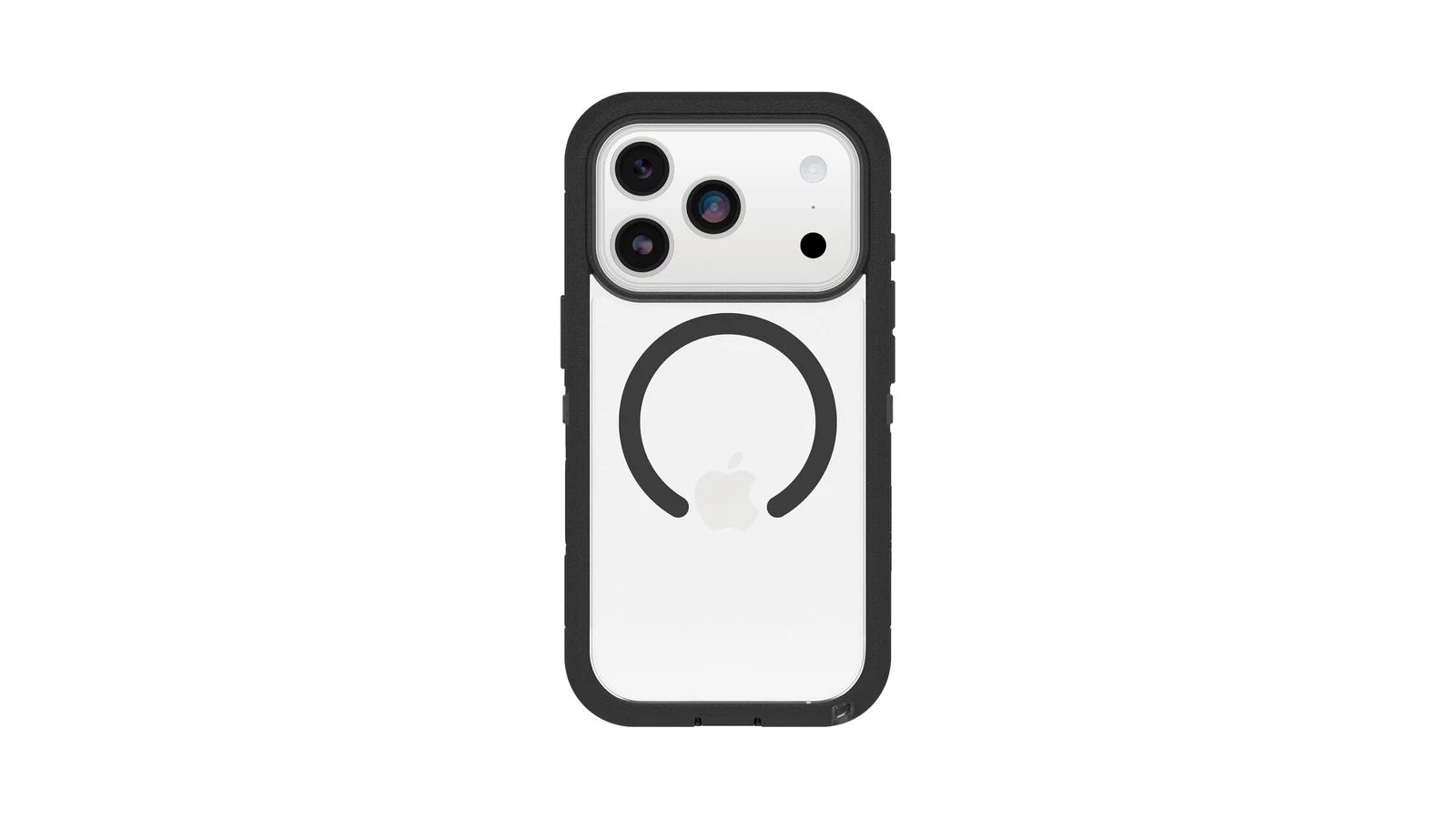
How much bulk does the Defender Series Pro XT add?
OtterBox lists the case at 49.14 grams and 6.36 by 3.34 by 0.62 inches. At 3.34 inches wide, it turns the iPhone 17 Pro into a substantially larger object to hold and carry. Owners repeatedly praise the case's grip and solid construction, but bulk and width are also recurring complaints. That exchange—more structure for more size—is the reason to buy it or reject it.
Why the construction matters more than the drop claim
OtterBox says the Defender Series Pro XT is tested to seven times the MIL-STD-810G 516.6 drop standard. The company does not publish enough protocol detail to compare that multiplier directly with the other cases, so it is not the main reason this product wins. The more useful evidence is visible in the construction: two layers, covered ports, rubberized sides, raised edges, and an integrated Camera Control button.
One owner reported that the iPhone 17 Pro's camera plateau remained exposed. That single report is not enough to establish a common defect, but it is worth checking when the case arrives because camera coverage is central to this recommendation. If the camera surround on your unit does not provide the separation you expect, the case is not fulfilling its protection-first job.
Best iPhone 17 Pro case for thin everyday carry
Caudabe Veil is the pick for buyers who want a case to change the iPhone 17 Pro as little as possible. Its semi-rigid polymer shell, matte surface, textured sides, and button covers provide a barrier against scratches, scuffs, and minor bumps without the layered enclosure of the OtterBox. That minimal shape is also the compromise: Veil is not the case to choose for rugged protection, and it has no built-in magnet. Choose Apple Silicone if MagSafe accessories are part of your daily setup, or OtterBox if impact-oriented coverage matters more than thinness.
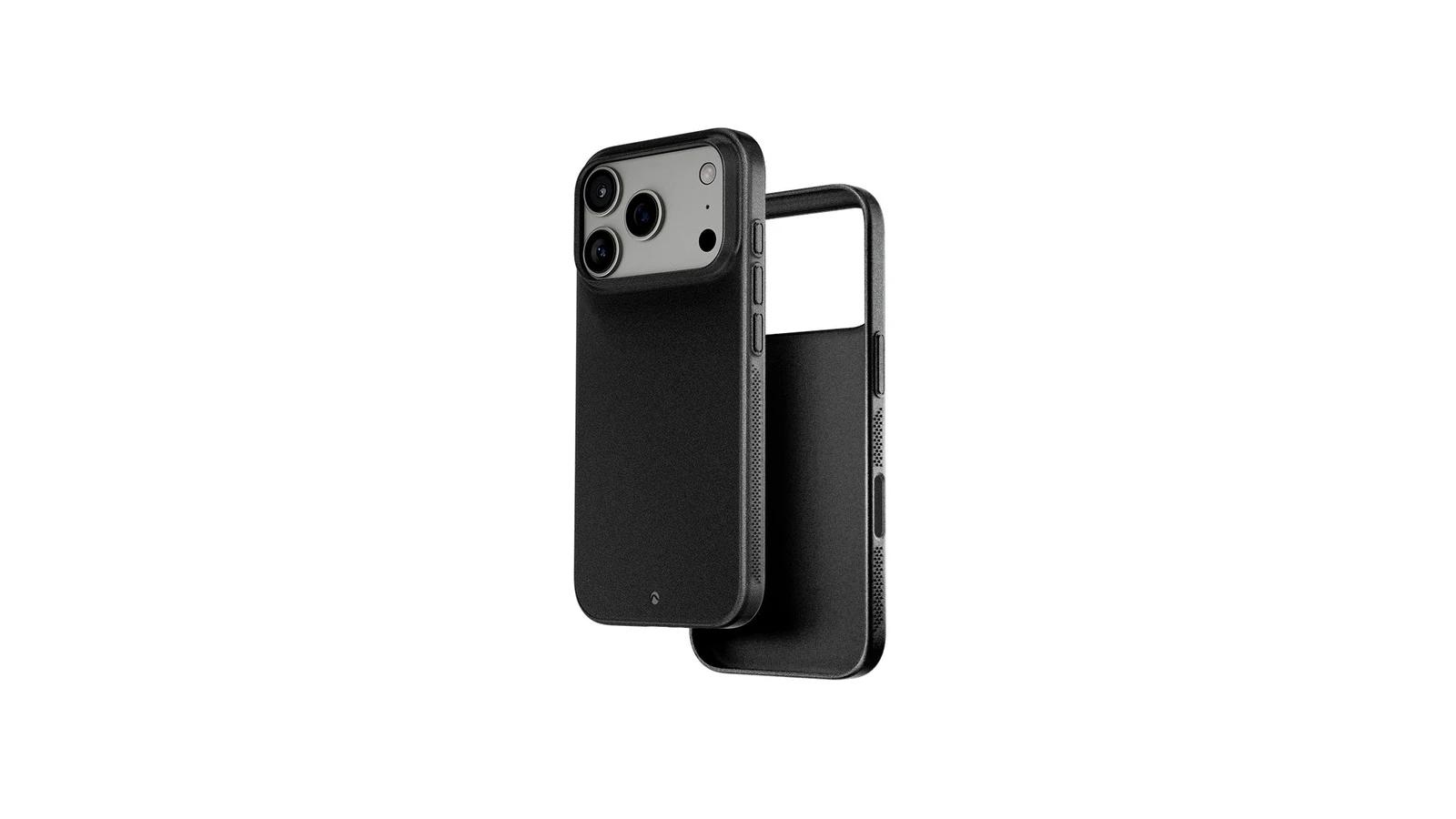
What the minimal design covers
Veil wraps the sides and covers the power, volume, and Action buttons, while Camera Control remains accessible through an opening. The camera area is largely open, with a small ridge intended to keep the protruding lenses away from a surface. This preserves the close-to-the-phone appearance, but it leaves more of the camera plateau exposed than a larger surround would.
The case makes the most sense as light everyday coverage: enough to separate the phone from keys, desks, and routine scuffs, but not a substitute for a deep lip, port covers, or a multi-layer shell. At a $35 list price, it is also the least expensive pick in this guide.
Why MagSafe users should skip it
Caudabe lists Veil as having no magnet. It can allow wireless charging through the case, but the case itself is not designed to provide the magnetic hold expected by a MagSafe wallet, mount, or battery.
Do not buy Veil if secure magnetic attachment is a requirement. Apple Silicone is the slimmer alternative in this group with built-in magnets; OtterBox adds magnets alongside much more enclosure.
Best iPhone 17 Pro case for a soft, secure hand feel
Apple's Silicone Case with MagSafe is our soft-handling pick, not a claim that it is the grippiest case available. The soft-touch silicone, microfiber lining, built-in magnets, and covered Camera Control make it the most conventional Apple-integrated everyday option in this group. Independent reviewers describe it as comfortable with decent grip. The main compromise is durability: silicone can attract pocket dust and show cosmetic wear sooner than harder materials. Choose Nomad if you want a richer material that is meant to develop patina, or Veil if minimum bulk matters more than softness.
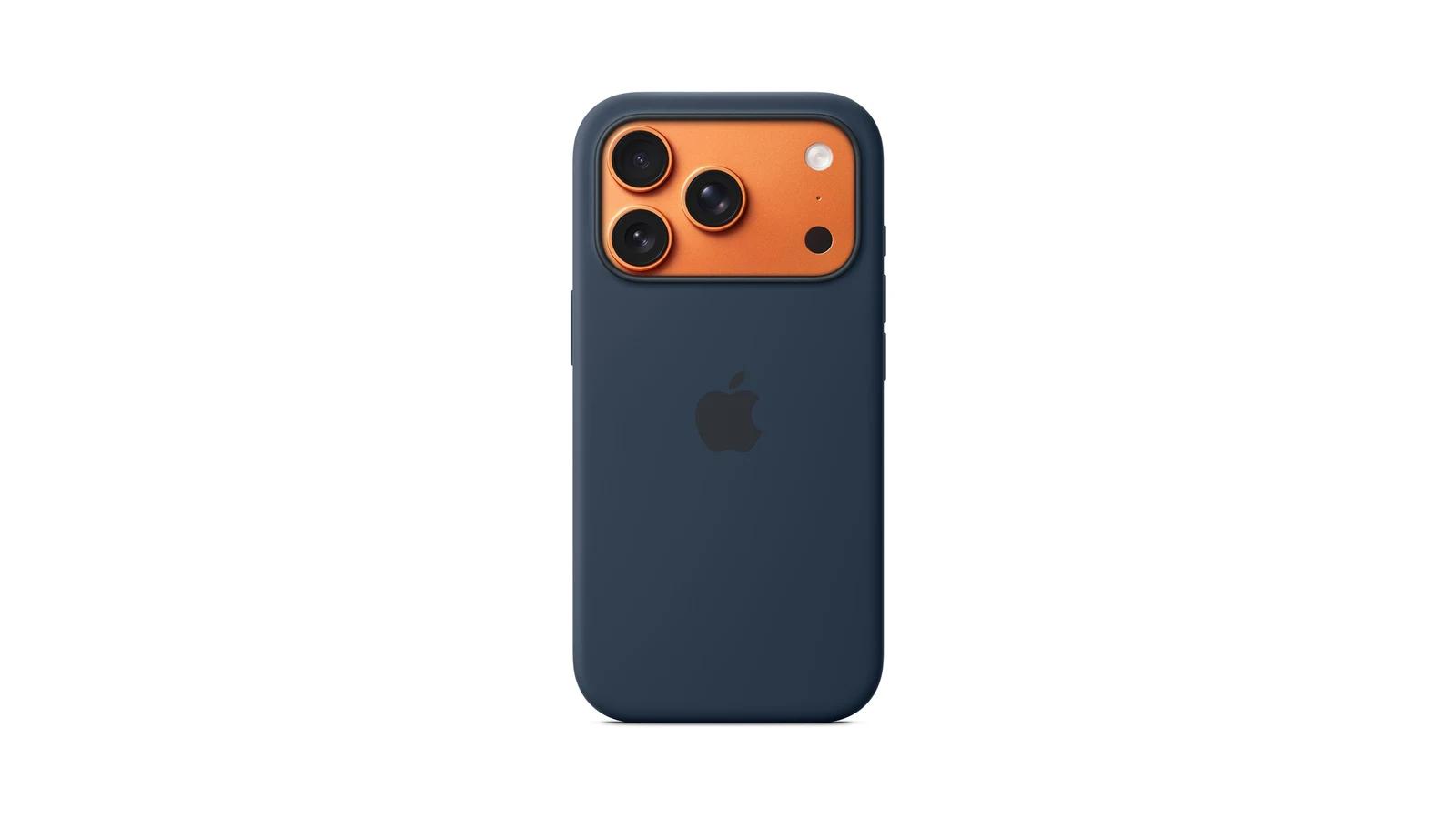
The everyday advantage is integration
The case supports Camera Control through Apple's conductive button design, so presses and swipes work without a large opening in the side. Its built-in magnets support MagSafe, and Apple lists Qi2 charging up to 25W as well as Qi charging. Those features make it easier to recommend to someone who uses several Apple-style accessories and wants one familiar case rather than the most specialized option.
The soft surface adds friction without deep contours or the thick rubber sides of the OtterBox. That is enough for a more secure everyday hold than a slick bare phone, but buyers seeking maximum grip and protection should still choose the Defender Series Pro XT.
Soft silicone comes with wear and dust
Owners commonly report that Apple's silicone cases collect lint or dust at pocket openings. Longer-term reports also include stretching, discoloration, surface wear, and separation. These issues do not affect every case, but they make the $49 list price harder to justify if keeping the finish pristine is your priority.
Protection is moderate rather than rugged. The microfiber lining and raised edge help with routine scratches and surface contact, while the slim profile avoids the bulk of OtterBox. That middle ground is exactly why this is the easiest pick here for someone who wants softness, MagSafe, and Apple controls in one case.
Best clear iPhone 17 Pro case for showing the phone
Apple's Clear Case with MagSafe is our clear-style pick for buyers who want the phone's sides and some of its finish visible without giving up Apple's Camera Control and magnetic-charging integration. It is not fully transparent: the iPhone 17 Pro version has a large opaque rear section beneath the camera plateau. That is the defining compromise, along with a nearly open bottom. If an uninterrupted view of the entire rear is the goal, do not buy this case; none of the other winners in this shortlist directly replaces it as a fully transparent MagSafe option.
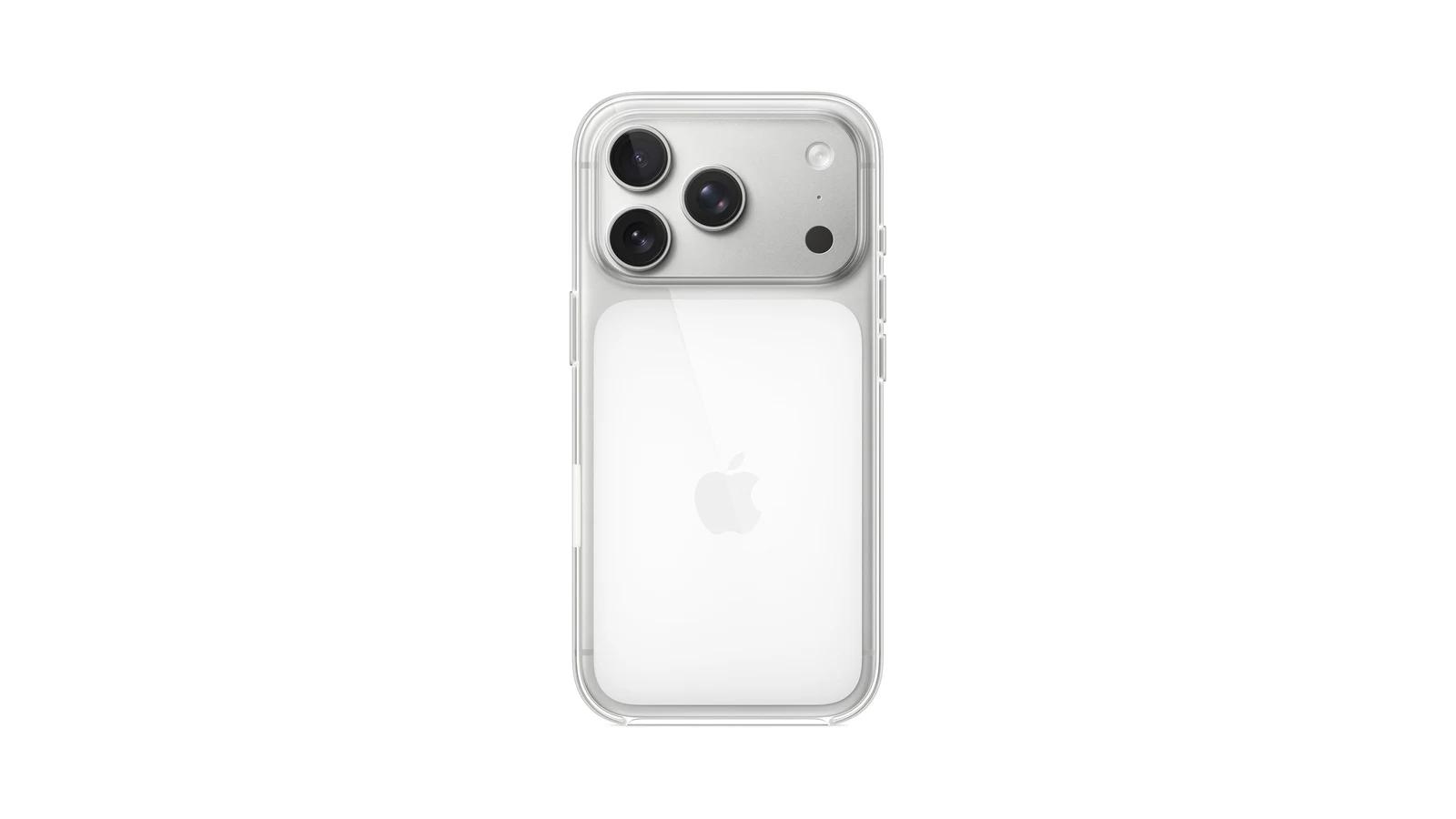
How much of the iPhone 17 Pro remains visible
The transparent sidewalls and lower rear reveal more of the phone than an opaque silicone, leather, or rugged case. The white rear structure, however, covers a substantial part of the iPhone 17 Pro's back. Calling it clear-style is more accurate than calling it completely clear, and seeing that design before checkout matters more than any anti-yellowing promise.
Apple says its material blend and coatings are intended to resist scratches and yellowing. Those claims support the design intent, but clear cases still accumulate visible marks and can change with age. The $49 list price is paying primarily for the Apple-specific fit, Camera Control design, and built-in magnets—not for guaranteed permanent clarity.
The open bottom limits coverage
Independent coverage describes the bottom as nearly fully open and reports a raised edge around the camera. The open lower edge makes swipes and port access straightforward, but it leaves less material around a common impact area than the OtterBox or Apple Silicone designs. Choose OtterBox if enclosure matters more than visibility; choose Apple Silicone if you want an Apple-made MagSafe case and do not care about seeing the phone through it.
This pick only makes sense if you are comfortable with partial visibility. It shows the sides and parts of the finish while keeping Apple's integrated controls, but it is not a fully transparent case.
Best iPhone 17 Pro case for traditional leather feel
Nomad's Traditional Leather Case is the pick for buyers who specifically want real leather, metal controls, and a case that develops character with use. Full-grain leather wraps the exterior, while aluminum buttons and a metal camera ring give the controls and camera area a more premium construction than the silicone and clear picks. That material experience costs more and will not stay pristine. Choose Apple Silicone if you want softer handling and Apple integration for less, or OtterBox if protection matters more than leather.
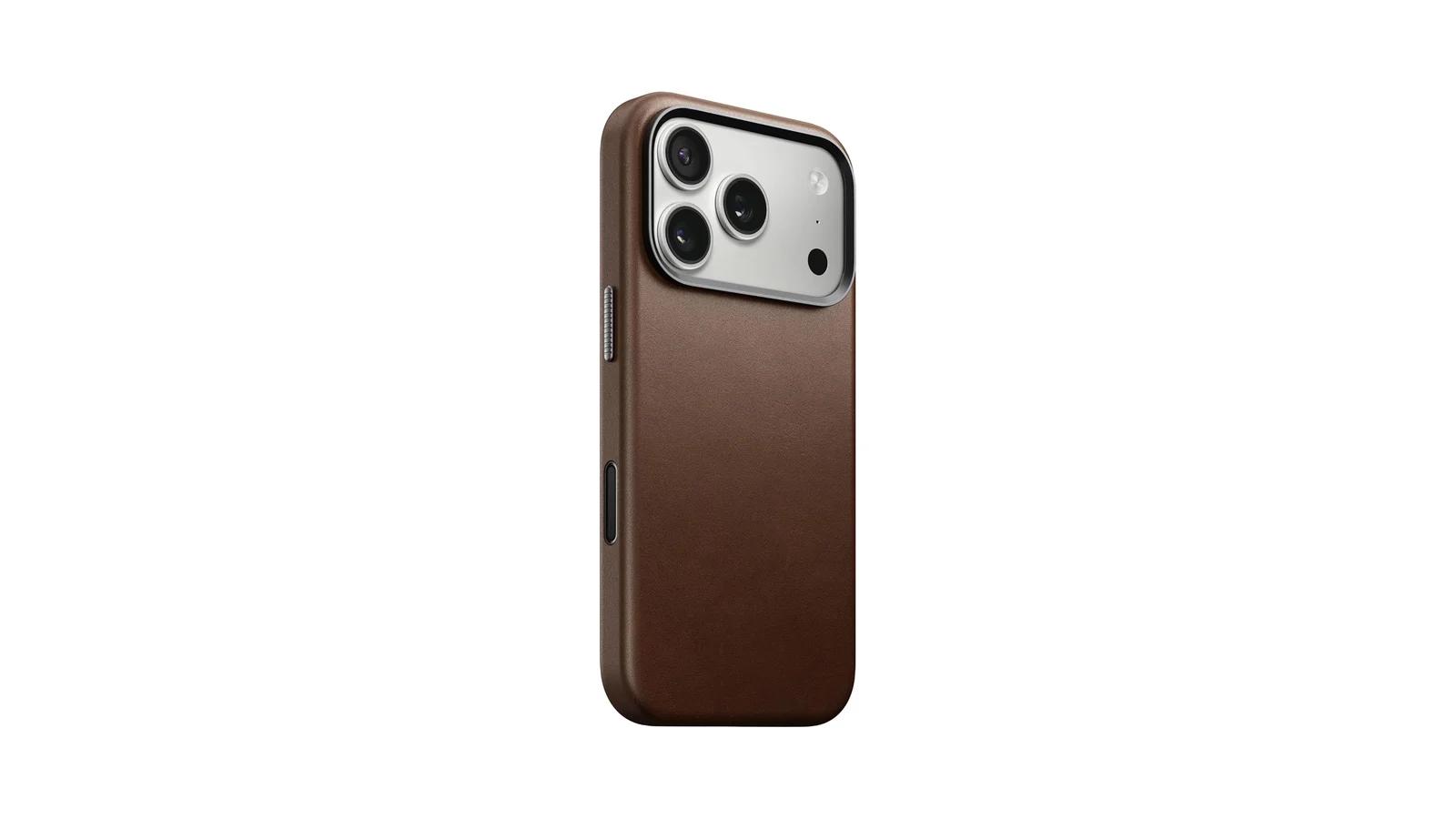
Camino or Horween: what the extra cost buys
Nomad offered Camino Leather at a $79 list price and Horween Leather at $89 when researched. Both versions deliver the core reason to choose this case: genuine leather that will scuff, darken, and develop patina rather than imitate leather with a uniform synthetic finish. Camino is the better-value route to the same overall case design; pay the extra $10 for Horween only if that tannery and leather option are specifically part of what you want.
The premium also covers details beyond the surface material. Nomad uses aluminum buttons, a metal camera ring, microfiber lining, a covered Camera Control button, built-in magnets, and Qi2 compatibility. Its listed 1.15 mm raised screen edge helps keep the display away from a flat surface, though screen-protector fit still depends on the shape of the protector.
Natural wear is a feature only if you want it
Independent coverage describes responsive metal buttons and a leather surface that begins to show patina with use. Scuffs and marks can appear early, especially around edges and high-contact areas. That is normal for this material, not evidence that the case failed—but it is still a bad fit for someone who wants the case to look unchanged.
The value question is simple: Nomad makes sense when genuine leather, tactile metal controls, and visible aging are worth a premium to you. If those details sound ornamental rather than essential, Apple Silicone provides Camera Control, MagSafe, and a soft surface for considerably less.
Best iPhone 17 Pro case with a landscape stand
The Beats iPhone 17 Pro Kickstand Case is the most specialized recommendation here. Its removable wrist lanyard connects to a locking adapter that becomes a landscape stand, making it useful for video, calls, and desk viewing without a separate accessory. The compromise is carrying that extra component, and the stand is for landscape use rather than upright portrait viewing. Choose Apple Silicone if you will rarely deploy the stand and would rather carry a simpler MagSafe case.
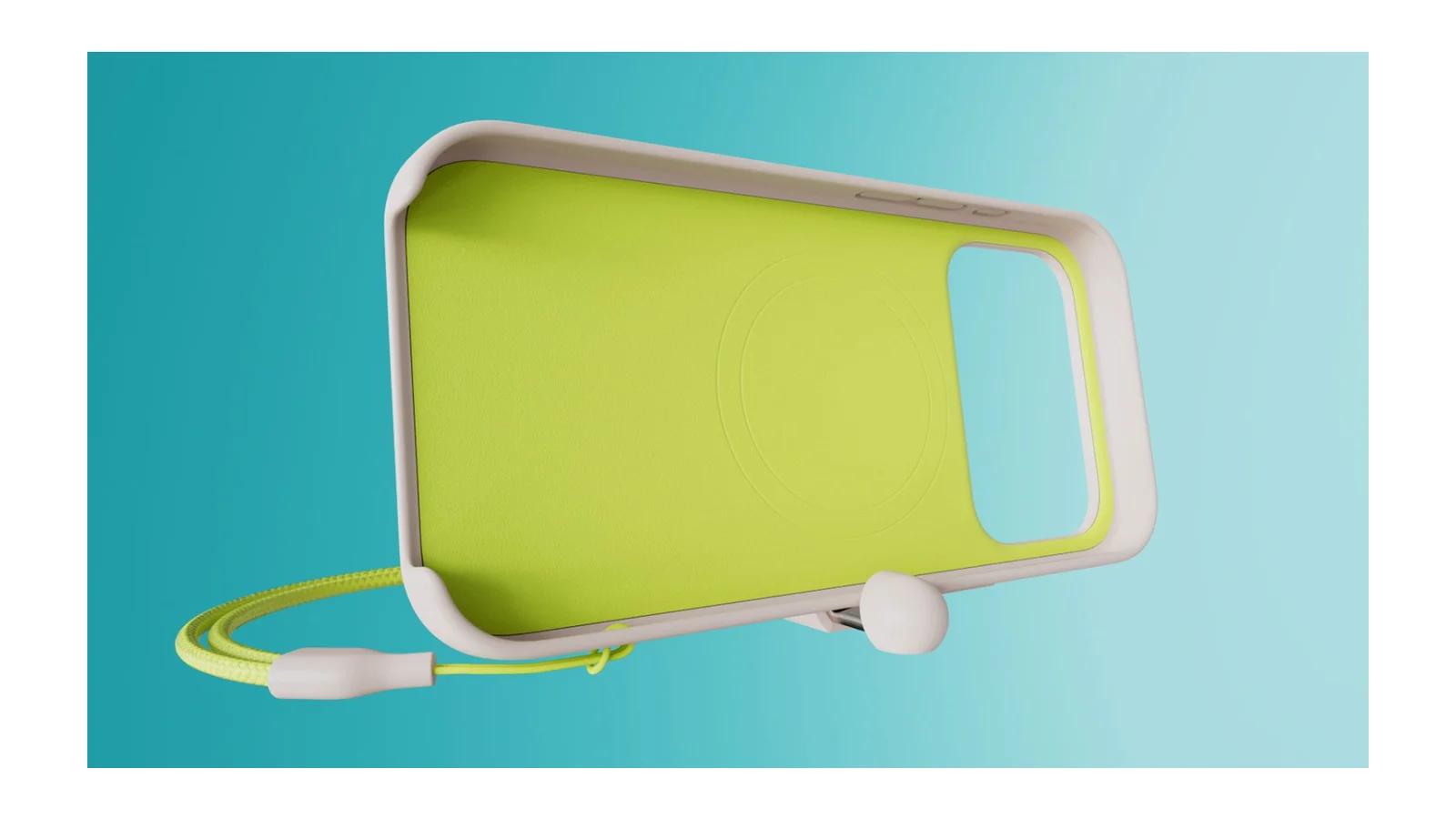
How the removable lanyard becomes a stand
The lanyard attaches to a single anchor on the case for wrist security. Opening its magnetic adapter creates the support for landscape viewing. This is more purposeful than a decorative strap: it solves two specific jobs, but only for buyers who will use both of them.
Beats listed the case at $59 when researched. That places it above the two Apple cases but below Nomad and OtterBox. The extra money pays for the convertible lanyard mechanism; if you already use a separate stand or dislike straps in a pocket, the value disappears quickly.
Carry security versus carry complexity
An independent reviewer found the case itself relatively slippery but considered the strap helpful for holding security. Owners also describe the case as light and not bulky, while some dislike carrying the lanyard in a pocket. At 39.4 grams with the strap, it is lighter than the OtterBox but still adds a loose component that can catch or bunch during carry.
The single anchor sits on the right side, which may be less natural for some left-handed users. The lower front is open for easier swiping, so this is not the enclosure-first choice. Built-in magnets and Camera Control support keep the core iPhone 17 Pro features intact, but the case earns its place only when the stand or wrist strap solves a real daily problem.
Best iPhone 17 Pro cases compared
Prices below are U.S. list prices recorded during research and may change. Relative bulk and coverage are qualitative comparisons within these six picks, not laboratory ratings.
Case
- Best for
- Protection-first use
- Bulk and coverage
- Bulkiest; layered enclosure, port covers, raised edges
- MagSafe and Camera Control
- Built-in magnets; covered control
- Price position
- Premium, $79.99
- Main tradeoff
- Width and weight
Case
- Best for
- Near-caseless carry
- Bulk and coverage
- Thinnest; light scratch and bump coverage, open camera area
- MagSafe and Camera Control
- No built-in magnet; control cutout
- Price position
- Lowest, $35
- Main tradeoff
- Limited enclosure and no magnetic hold
Case
- Best for
- Soft everyday handling
- Bulk and coverage
- Moderate; lined shell with raised edges
- MagSafe and Camera Control
- Built-in magnets; covered control
- Price position
- Mid-range, $49
- Main tradeoff
- Dust and cosmetic wear
Case
- Best for
- Showing the sides and some finish
- Bulk and coverage
- Moderate; raised camera edge, nearly open bottom
- MagSafe and Camera Control
- Built-in magnets; covered control
- Price position
- Mid-range, $49
- Main tradeoff
- Opaque rear section and open lower edge
Case
- Best for
- Real leather and premium controls
- Bulk and coverage
- Moderate; raised screen edge and metal camera ring
- MagSafe and Camera Control
- Built-in magnets; covered control
- Price position
- Premium, $79–$89
- Main tradeoff
- Higher price and visible natural wear
Case
- Best for
- Landscape viewing and wrist carry
- Bulk and coverage
- Moderate; open lower front, 39.4 g with strap
- MagSafe and Camera Control
- Built-in magnets; covered control
- Price position
- Mid-to-premium, $59
- Main tradeoff
- Extra carry component; landscape-only stand
Swipe table to view all columns.Scroll table to view all columns.
| Case | Best for | Bulk and coverage | MagSafe and Camera Control | Price position | Main tradeoff |
|---|---|---|---|---|---|
| OtterBox Defender Series Pro XT | Protection-first use | Bulkiest; layered enclosure, port covers, raised edges | Built-in magnets; covered control | Premium, $79.99 | Width and weight |
| Caudabe Veil | Near-caseless carry | Thinnest; light scratch and bump coverage, open camera area | No built-in magnet; control cutout | Lowest, $35 | Limited enclosure and no magnetic hold |
| Apple Silicone Case | Soft everyday handling | Moderate; lined shell with raised edges | Built-in magnets; covered control | Mid-range, $49 | Dust and cosmetic wear |
| Apple Clear Case | Showing the sides and some finish | Moderate; raised camera edge, nearly open bottom | Built-in magnets; covered control | Mid-range, $49 | Opaque rear section and open lower edge |
| Nomad Traditional Leather Case | Real leather and premium controls | Moderate; raised screen edge and metal camera ring | Built-in magnets; covered control | Premium, $79–$89 | Higher price and visible natural wear |
| Beats Kickstand Case | Landscape viewing and wrist carry | Moderate; open lower front, 39.4 g with strap | Built-in magnets; covered control | Mid-to-premium, $59 | Extra carry component; landscape-only stand |
Which iPhone 17 Pro case should you buy?
Start with the compromise, not the feature list. Choose the OtterBox Defender Series Pro XT if added size is acceptable in exchange for the most protective construction in this group. Choose Caudabe Veil if preserving the phone's shape matters more than enclosure—and only if you do not rely on magnetic accessories.
The Apple Silicone Case is the conventional middle choice for soft handling, Camera Control, and MagSafe without rugged bulk. The Apple Clear Case is for partial phone visibility with the same Apple integration, but its opaque rear makes it unsuitable for anyone seeking a fully transparent case.
Pay more for Nomad when real leather, metal controls, and patina are the point of the purchase. Buy Beats when you know the landscape stand or wrist strap will be used often; otherwise, the extra component is harder to justify than a simpler MagSafe case.
Five checks when your case arrives
Keep the packaging until these checks are complete and follow the retailer's return conditions.
- Confirm the model and controls. The packaging should say iPhone 17 Pro. Test the side, volume, Action, and Camera Control buttons without forcing the phone into the case.
- Check the USB-C and speaker openings. Your usual cable should seat fully, and the case should not visibly block the speaker or microphone openings.
- Inspect the screen edge. Look for an even gap around any screen protector, with no lifting, bubbles, or pressure from the case.
- Inspect the camera area. Confirm that the surround clears the lenses, does not intrude into the camera view, and provides the surface separation you expected.
- Test the accessories that justified the purchase. Attach your MagSafe wallet, mount, charger, or battery. For Beats, also set up the stand on the surface where you plan to use it.