
Yes, Back Market is legit. It's an established company, founded in Paris in 2014, and every order comes with a 1-year warranty and 30 days to return the device if you're not happy with it. Back Market's US business holds a 4.5 out of 5 rating on Trustpilot and an A+ from the Better Business Bureau.
What most buyers don't realize is that Back Market doesn't refurbish anything itself. It's a marketplace: independent sellers repair, test and ship every phone, tablet, laptop and console on the site. That's why two people can buy the same model and have very different experiences. The seller and the grade you pick matter more than the Back Market name.
Most complaints involve a replacement screen or battery the buyer didn't expect, battery health lower than they hoped, or slow support when something goes wrong. This guide shows how to pick a listing that avoids those problems and what to check before your return window closes.
How Back Market works: who actually refurbishes your device
Professional sellers do the refurbishing. They clean, test and repair each device, wipe it with a factory reset, and ship it to you. Back Market runs the storefront, takes payment, sets the quality rules sellers have to follow, and handles customer service and disputes.
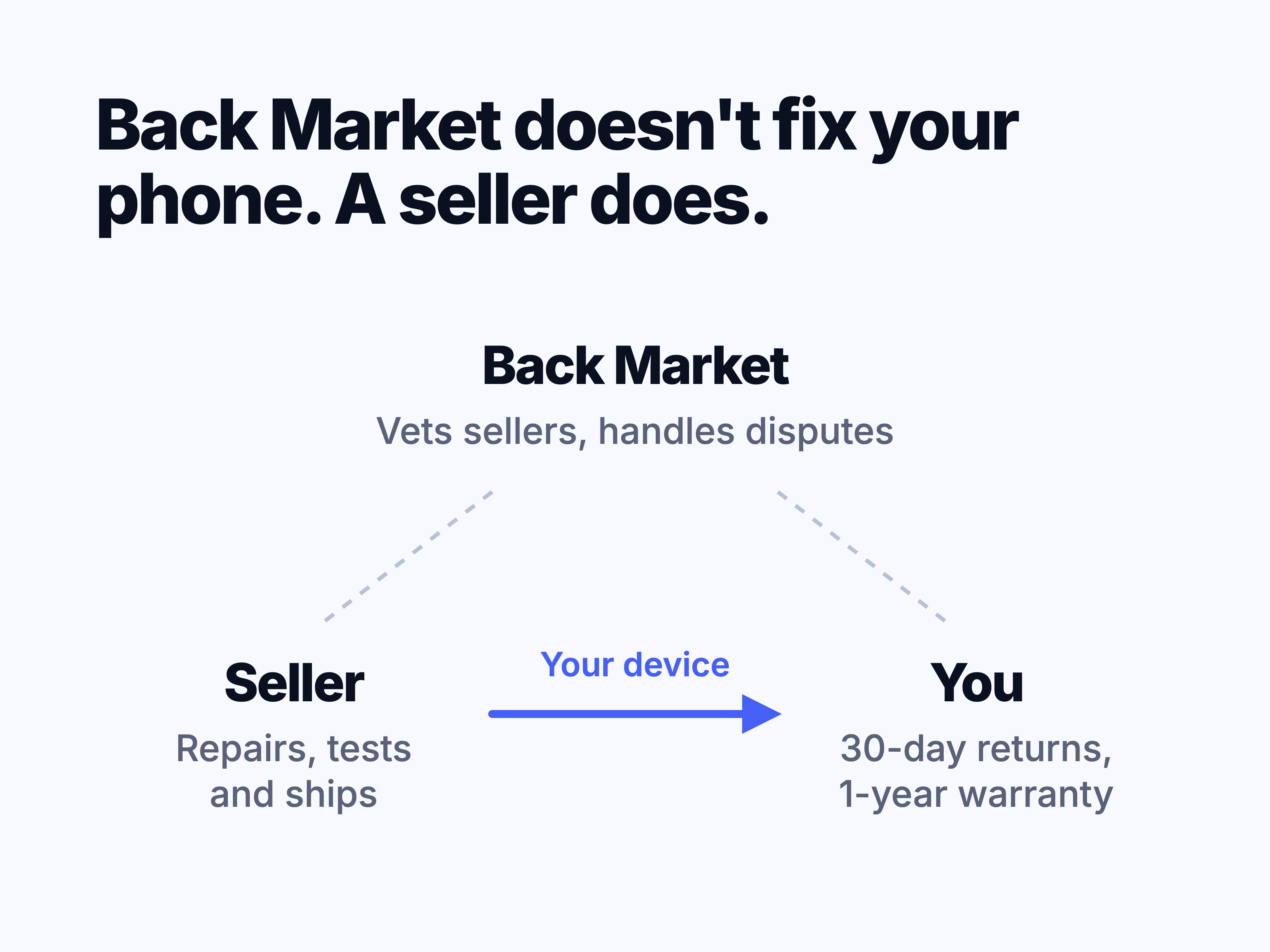
Back Market says it screens sellers before they can join, then keeps checking them with mystery orders, site visits, quality tracking and customer reviews. That system is good at catching sellers with repeated problems. It isn't a check on your device: Back Market doesn't inspect each item before it ships, so the condition of the phone in your box depends on the seller who prepared it.
Why the same model has different prices on Back Market
Sellers set their own prices, and the price changes with the grade, storage and battery option. For each model, storage, color and grade, Back Market's algorithm picks one offer to show first, based on price and quality. The price you see first is Back Market's pick, not the only offer, so check which seller it comes from before you buy.
Back Market reviews: what buyers praise and complain about
Back Market's US page on Trustpilot is rated 4.5 out of 5 from 20,341 reviews as of November 2026. The reviews shown on Back Market's own site are collected by Back Market, so treat them as the company's view.
The Better Business Bureau gives Back Market Inc. an A+ rating and has listed it as accredited since 2022. The BBB has also logged 987 complaints in the last 3 years, 279 of them in the past 12 months. The letter grade mostly reflects how the company responds to complaints, so the complaints themselves are the better guide to what can go wrong.
Satisfied buyers mention the same things: the device looked better than its grade suggested, it cost far less than new, and they'd buy again. Repeat customers on Reddit and Trustpilot describe buying several phones, iPads and MacBooks without trouble.
The complaints follow a pattern too:
- A replacement screen or battery the listing didn't mention
- Battery health lower than the buyer expected
- The wrong model, or a charger that doesn't fit
- Customer service that's slow to reply or hard to reach
- Warranty claims turned down because the seller says the device was dropped
Is Back Market a scam?
No. Orders arrive, the warranty and return window are real, and Back Market refunds buyers when sellers miss their deadlines. The risk is different: you might get a device that's worse than you expected, then spend time getting it fixed or refunded. Choosing the listing carefully and checking the device the day it arrives covers most of that risk.
What Back Market grades mean for the screen
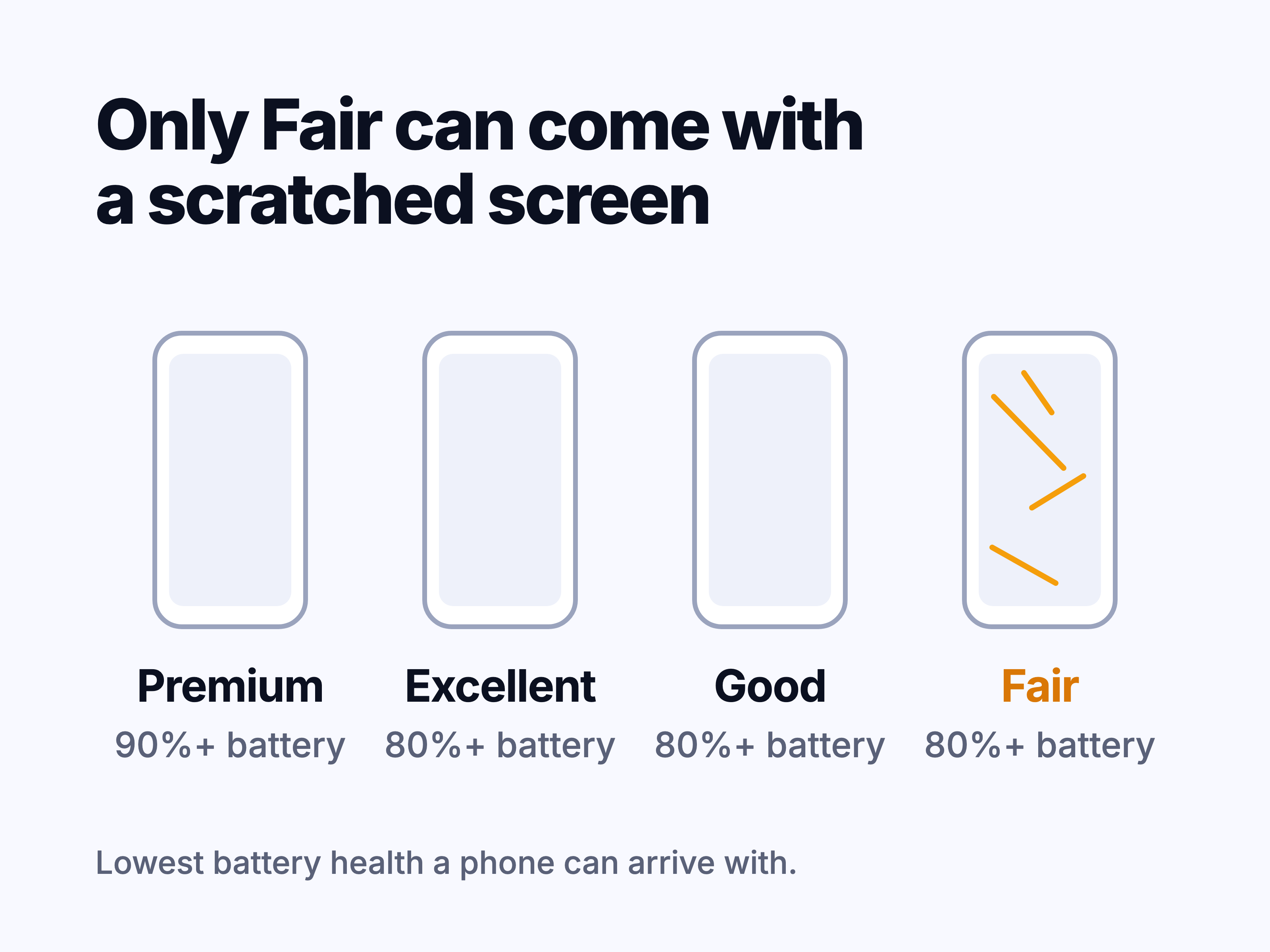
Back Market grades describe how a device looks, not how well it works, and every grade is supposed to be fully functional. Phones, tablets, laptops, desktops and smartwatches come in four grades:
Swipe sideways to compare columns.Scroll table to view all columns.
| Grade | What to expect |
|---|---|
| Premium | Screen and body show almost no signs of use. Original manufacturer parts and battery only, with at least 90% battery capacity. |
| Excellent | No screen scratches. Body micro-scratches you can't see from 8 inches away. |
| Good | No screen scratches. Light body micro-scratches you can't see from about arm's length (20 inches). |
| Fair | Light screen scratches that may show when the screen is on. Visible scratches or dents on the body, and possibly an engraving. |
Other items, like headphones and game consoles, come in just two grades: Excellent and Good. The photos on a listing show the model, not the unit you'll receive. You may also see Outlet offers, which aren't a grade at all: they're working devices with more wear than Fair, sold for less.
Is Fair condition worth it on Back Market?
Fair is the cheapest grade and the only one that allows scratches on the screen. On a phone that will live in a case with a screen protector, light scratches are easy to stop noticing. On a laptop or tablet you look at for hours, they're harder to ignore, and they catch the light most on dark backgrounds. If the display matters to you, Good is usually the better buy.
Back Market Premium: when the extra cost is worth it
Premium is the only grade that promises original parts and at least 90% battery capacity. It's worth the extra if you want a genuine screen, plan to sell or trade in the device later, or don't want to deal with parts warnings at all. Premium isn't available on every model and shows up most often on recent ones.
Original parts: the part of Back Market most reviews skip
Back Market's help center says sellers repair devices with "compatible or genuine parts" and that original parts aren't promised. Only Premium listings commit to them. Any other grade can come with a third-party screen or battery, and the listing won't say which.
Back Market says these replacement parts perform the same as the originals. Apple disagrees. Its support page on iPhone displays says a non-genuine screen can cause:
- Parts of the screen that don't respond to touch, or touches that land in the wrong place
- True Tone and auto-brightness that don't work correctly
- Colors that look too yellow or too blue
- Uneven brightness or a lower maximum brightness
- Unexpected battery drain
Many replacement screens work fine, but you can't tell from the listing, so test the screen yourself while you can still return the device. Apple also says a part listed as "Unknown" can lower an iPhone's trade-in value, though the message itself doesn't stop you from using the phone.
How to check if a refurbished iPhone has an original screen
On iPhone 11 and later (except iPhone SE 2nd and 3rd generation), go to Settings > General > About and look for Parts and Service History. The section only appears if the phone has been repaired.
- Genuine means an original Apple part, installed and verified.
- Used (iPhone 15 and later on iOS 18 or later) means a genuine part that came from another iPhone.
- Unknown means the part isn't genuine, isn't working as expected, or wasn't linked to the phone after the repair.
After a non-Apple repair, iOS also shows a warning on the lock screen for about 4 days and at the top of Settings for about 15, according to Back Market. After those disappear, Parts and Service History still shows the record. You might also see a "Used Battery" message after a battery replacement, or the year 1978 under About. Back Market says both are normal on refurbished iPhones: 1978 is a placeholder date Apple uses once its own warranty has ended.
Android phones, tablets and laptops
Most Android phones, tablets and laptops have no equivalent of Parts and Service History. Samsung Members can run hardware checks, which helps, but it isn't a repair record. On these devices, the screen tests later in this guide are the best way to catch a problem.
Is a non-genuine screen a reason to return a Back Market iPhone?
On a listing that isn't Premium, Back Market doesn't treat an "Unknown" display as a defect. Problems you can see are a different matter: dead touch areas, a color tint, low brightness or True Tone that doesn't work can all be reported to the seller as defects. Within the first 30 days you don't need a reason at all, so an "Unknown" screen you're not comfortable with is enough to send the device back.
Back Market battery health: what's covered
Every device has to arrive with at least a minimum battery capacity:
- Smartphones: 80%
- Smartphones with the Extra charge battery option: 90%
- Everything else, including tablets and laptops: 85%
If a battery drops below 80% within 3 months of delivery, you can ask for a repair. With the Extra charge option, the battery is covered if it falls below 90% in the first 30 days or below 80% within 12 months. After that, normal battery wear isn't covered.
How to check battery health on a Back Market device
- iPhone: Settings > Battery > Battery Health, then look at Maximum Capacity.
- Samsung Galaxy: open Samsung Members, then Get help > Interactive checks > Battery.
- Mac: System Settings > Battery, then the info button next to Battery Health.
- Windows laptop: run powercfg /batteryreport in Command Prompt, open the report it saves, and compare Full charge capacity with Design capacity.
After some battery replacements, an iPhone may not show battery health at all, Back Market notes. If yours doesn't, ask the seller what capacity the battery tested at, and ask before your 30 days are up.
Back Market warranty and return policy, in plain terms
Swipe sideways to compare columns.Scroll table to view all columns.
| What happened | What happens next |
|---|---|
| You changed your mind within 30 days | Return the device with a prepaid label for a refund. No reason needed. |
| A defect appears within 12 months | The seller repairs it, replaces it if repair isn't possible, or refunds you. |
| The device was dropped, got wet or was opened by someone else | The warranty doesn't cover it. |
| The battery wore down with normal use | Not covered once the battery window ends. |
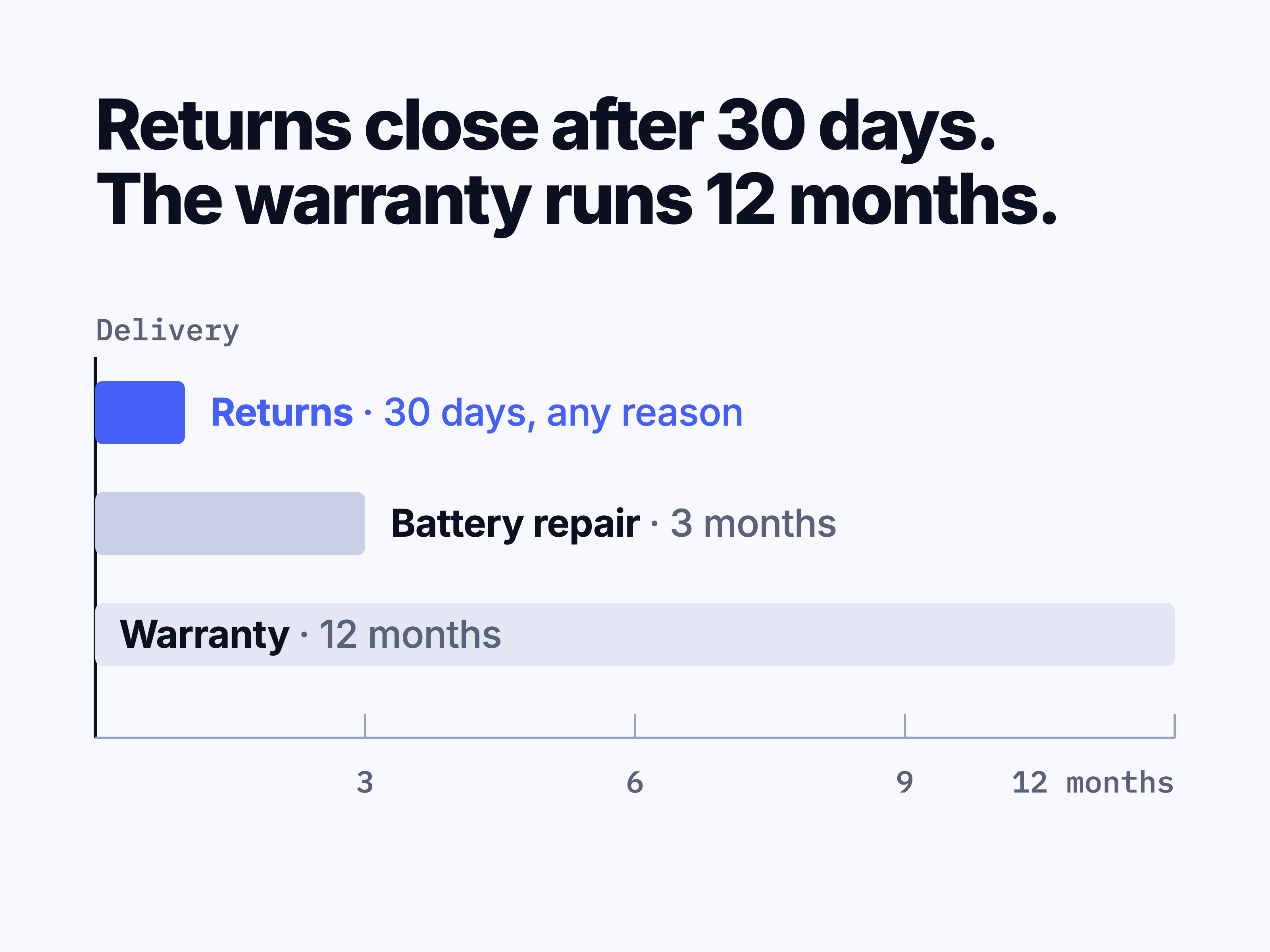
The 30 days start on the day you receive the device. Orders placed between Black Friday and December 31 get a longer window: you can return them for any reason until January 31. Before you send anything back, sign out of iCloud, Google or Samsung accounts and turn off Find My, or the refund will be delayed.
The warranty comes from the seller, with Back Market as the backstop. Once the seller receives your return, it has 3 business days to refund you, 5 to repair most devices, or 7 for laptops and bulky items. If it misses that deadline, Back Market says you'll get a full refund, as long as there's no sign of a drop, liquid or a third-party repair. The money then takes about 7 business days to reach a card or PayPal, and 10 for Affirm or Klarna.
Water resistance isn't promised on Back Market phones and watches
Refurbished devices are opened for testing, and Back Market says the original water seal is rarely kept. Liquid damage also voids the warranty. Treat a refurbished phone or smartwatch as not water resistant, whatever rating the model had when new.
Report problems right away
Back Market says it can turn down reports that come in late. If something looks wrong, open a request the same day, even if you haven't decided whether to keep the device.
Back Market Protection Plan
The warranty doesn't cover drops, cracked screens or water damage. Back Market's optional Protection Plan, run by Bolt, does. You can add it at checkout or within 30 days of buying. Smartphone claims carry a service fee, and the plan doesn't cover theft, loss or cosmetic damage.
How to pick a safer Back Market listing
- Check the seller. Open the seller's profile and look at its rating and how many reviews it has.
- Pick Good or better if you care about the screen. Fair is the only grade that allows screen scratches.
- Pick Premium if you want original parts. No other grade promises them.
- Add the Extra charge battery option if you keep phones for years. It raises the minimum to 90% and extends battery coverage to 12 months.
- For a phone, check whether it's unlocked. A carrier-locked phone costs less but only works with that carrier.
- Compare prices before you buy. The same model is often listed on Amazon Renewed and, for Apple devices, Apple Certified Refurbished.
If you're still deciding between refurbished and new, our guide to new vs refurbished iPhones walks through that choice.
What to check in the first 30 minutes after your Back Market order arrives
You have 30 days to return the device, but check it the day it arrives. A problem you find before you've used it is clearly the seller's, and you'll have plenty of time to act.
- Photograph the device from every side before you put a case on it or start using it. If a warranty claim is later blamed on a drop, these photos show how it arrived. Our guide to documenting damage for a warranty claim shows which shots help most.
- Compare the condition with the grade you paid for. Turn the screen off and look at it under a bright light for scratches.
- On an iPhone, check Parts and Service History in Settings > General > About.
- Check battery health against the minimum for your listing.
- Test the screen with the checks below.
- Check everything else. On a phone, try Face ID or the fingerprint sensor, both cameras, the speakers and microphones (make a call), charging, and signal with your SIM or eSIM. On a laptop, try every key, the trackpad, the webcam, each port and the charger.
- Make sure the device isn't locked to someone else. It should set up with your own Apple Account, Google account or Microsoft account without asking for a previous owner's details.
Screen tests to run on a Back Market device
- Run the dead pixel test to look for dead or stuck pixels on solid colors.
- On a phone or tablet, run the touch screen test and draw across the whole screen, including the edges, to find dead zones or ghost touches.
- On an OLED phone, tablet or laptop, use the burn-in test to look for faint leftover images, like a keyboard or status bar.
- Use the screen color test to check white and gray for a tint or uneven brightness.
- On an LCD laptop or tablet, the backlight bleed test shows light leaking in from the edges on a dark screen.
- On an iPhone or iPad, turn True Tone off and on and watch the whites shift, then cover the top of the screen with your hand to check that auto-brightness dims it.
These tests show what's visible on the screen. They can't tell you whether a part is original or how long the screen will last, but they catch the problems you can report to the seller.
What to do if something fails
Log in to your Back Market account, go to Orders > Get help, and open a request on that order. Upload photos from several angles. Back Market says it replies within 1 business day. If the device looks worse than its grade, you can return it within 30 days, or the seller may offer partial compensation if you'd rather keep it.
Back Market vs Apple Certified Refurbished and Amazon Renewed
Swipe sideways to compare columns.Scroll table to view all columns.
| Store | Best for |
|---|---|
| Back Market | A wide choice of devices and grades, and lower prices on older models. Quality depends on the seller. |
| Apple Certified Refurbished | Genuine Apple parts and Apple's own 1-year warranty, at a smaller discount and on fewer models. Apple devices only. |
| Amazon Renewed | Buying through Amazon's checkout and returns. Like Back Market, quality depends on the seller. |
For an Apple device that's as close to new as possible, Apple is the safer pick. If price and choice matter more, Back Market is usually the better deal, as long as you choose the seller and grade carefully. Buying from a private seller instead? Our used iPhone buying checklist covers the extra checks.
Common questions
Is it safe to pay on Back Market?
Yes. Card details are handled by Back Market's payment providers, and Back Market says it doesn't store your card number. Depending on the order, you can pay by card, PayPal, Apple Pay, Google Pay, Affirm or Klarna. A credit card also gives you your card issuer's dispute process if a refund ever stalls.
How do I contact Back Market customer service?
Log in to your Back Market account, go to Orders and choose Get help on the order. Back Market says it replies within 1 business day. Keep the whole conversation in that thread, so you have a record if the problem turns into a return or warranty claim.
Does Back Market sell stolen or locked devices?
Back Market's rules say devices can't be locked, stolen or fraudulently sourced. Check anyway: the device should set up with your own account without an Activation Lock or previous-owner screen, and a phone should work with your SIM or eSIM. If either fails, report it within 30 days.
Is Back Market trade-in legit?
Yes, but the offer can change. The refurbisher inspects your device, and if it doesn't match how you described it, you'll get a lower counteroffer. A $1 offer means they suggest recycling it. You can decline any counteroffer and get the device shipped back at no cost. Back Market's rules say refurbishers can't lower an offer because of battery health or earlier non-original repairs.