
How TV sizes are measured
A TV’s size is the length of the screen from one corner to the opposite corner, not counting the frame or the stand. On a standard 16:9 screen, the width works out to about 87% of that diagonal and the height about 49%, so a 65-inch screen measures 56.7 by 31.9 inches.
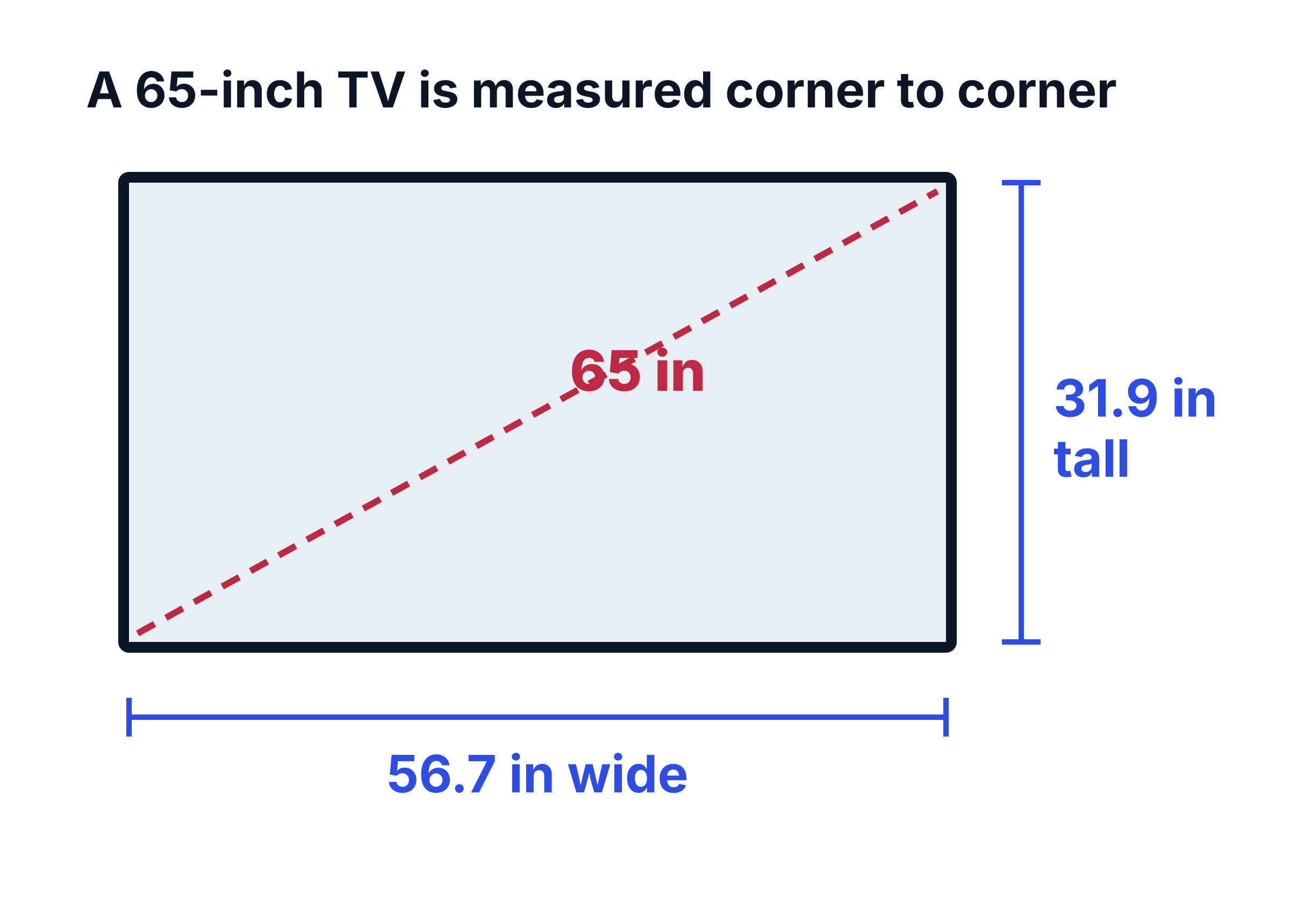
To check the size of a TV you already own, run a tape measure from the bottom-left corner of the picture to the top-right corner, leaving out the frame. To see whether a TV will fit somewhere, measure the whole TV instead: edge to edge including the frame, and down to the bottom of the stand if it sits on furniture.
TV size chart
Screen width and height for standard 16:9 TVs. The whole TV is a little bigger because of the frame.
Swipe sideways to compare columns.Scroll table to view all columns.
| TV size | Screen width × height |
|---|---|
| 32 in | 27.9 × 15.7 in (70.8 × 39.8 cm) |
| 40 in | 34.9 × 19.6 in (88.6 × 49.8 cm) |
| 43 in | 37.5 × 21.1 in (95.2 × 53.5 cm) |
| 50 in | 43.6 × 24.5 in (111 × 62.3 cm) |
| 55 in | 47.9 × 27 in (122 × 68.5 cm) |
| 60 in | 52.3 × 29.4 in (133 × 74.7 cm) |
| 65 in | 56.7 × 31.9 in (144 × 80.9 cm) |
| 70 in | 61 × 34.3 in (155 × 87.2 cm) |
| 75 in | 65.4 × 36.8 in (166 × 93.4 cm) |
| 77 in | 67.1 × 37.8 in (170 × 95.9 cm) |
| 83 in | 72.3 × 40.7 in (184 × 103 cm) |
| 85 in | 74.1 × 41.7 in (188 × 106 cm) |
| 98 in | 85.4 × 48 in (217 × 122 cm) |
| 100 in | 87.2 × 49 in (221 × 125 cm) |
For the real width, height and depth of current models, including the stand, see the 55-inch, 65-inch, 75-inch and 85-inch TV dimension pages.
What size TV you need for your seating distance
Two guidelines are widely used to match a TV to a room. SMPTE’s says the screen should fill at least 30 degrees of your view, and THX recommends about 40 degrees for a more cinema-like feel. Somewhere between the two, the screen feels big without making you turn your head to follow the action.
Swipe sideways to compare columns.Scroll table to view all columns.
| Seating distance | TV size that fits the view |
|---|---|
| 5 ft (1.5 m) | 37 to 50 in |
| 6 ft (1.8 m) | 44 to 60 in |
| 7 ft (2.1 m) | 52 to 70 in |
| 8 ft (2.4 m) | 59 to 80 in |
| 9 ft (2.7 m) | 66 to 90 in |
| 10 ft (3.0 m) | 74 to 100 in |
| 11 ft (3.4 m) | 81 to 110 in |
| 12 ft (3.7 m) | 89 to 120 in |
Resolution matters less than it used to. With 20/20 vision, the pixels on a 65-inch 4K TV blend together from about 4 ft 3 in away, so you can sit at the THX distance without seeing them. On a 1080p TV of the same size, that point is about 8 ft 5 in.
How high to mount a TV
Put the center of the screen at the height of your eyes when you’re sitting down. On a typical sofa that’s around 40 to 42 inches from the floor, which puts the bottom of a 65-inch screen about 26 inches up. If your seating is higher or lower, enter your own eye height in the calculator.
- Recliners: you sit lower and lean back, so mount the TV a few inches lower or tilt it down slightly.
- Above a fireplace: the screen ends up well above eye level, so a tilting or pull-down mount helps. Check that the wall above the fireplace doesn’t get hot.
- Bedrooms: if you watch lying down, the center of the screen can go higher than in a living room.
Comparing TV sizes
A few inches of diagonal add more screen than you’d expect, because the area grows with the square of the size.
Swipe sideways to compare columns.Scroll table to view all columns.
| Step up | Extra screen area |
|---|---|
| 50 to 55 in | 21% more |
| 55 to 65 in | 40% more |
| 65 to 75 in | 33% more |
| 75 to 85 in | 28% more |
| 85 to 100 in | 38% more |
Measure your space before you buy
- Wall or cabinet width: enter it in the calculator to see the largest size that fits, based on the widest current model of each size.
- TV stand: many TVs stand on two feet near the ends, so the stand has to be nearly as wide as the TV. A center pedestal needs less room. The size pages list the stand type for each model.
- Depth: TV feet often stick out further than the screen, so check the depth with the stand, not just the panel.
- The way in: an 85-inch TV is more than 6 feet wide before it’s even boxed, so measure doorways, stairs and elevators on the way to the room.
TV size FAQ
Is a TV measured with or without the frame?
Without. The size is the diagonal of the visible screen only. The frame adds a little to the width and height, and the stand adds to the height and depth.
Are all TVs 16:9?
Almost every TV sold today is 16:9, so the chart and calculator use that shape. Some movies are wider than 16:9, which is why black bars can appear above and below the picture.
Can a TV be too big for a room?
Only if you’d sit closer than the THX distance, where the screen fills more than 40 degrees of your view. For a 75-inch TV that’s about 7 ft 6 in. Any closer and you’ll be turning your head to follow the picture.