
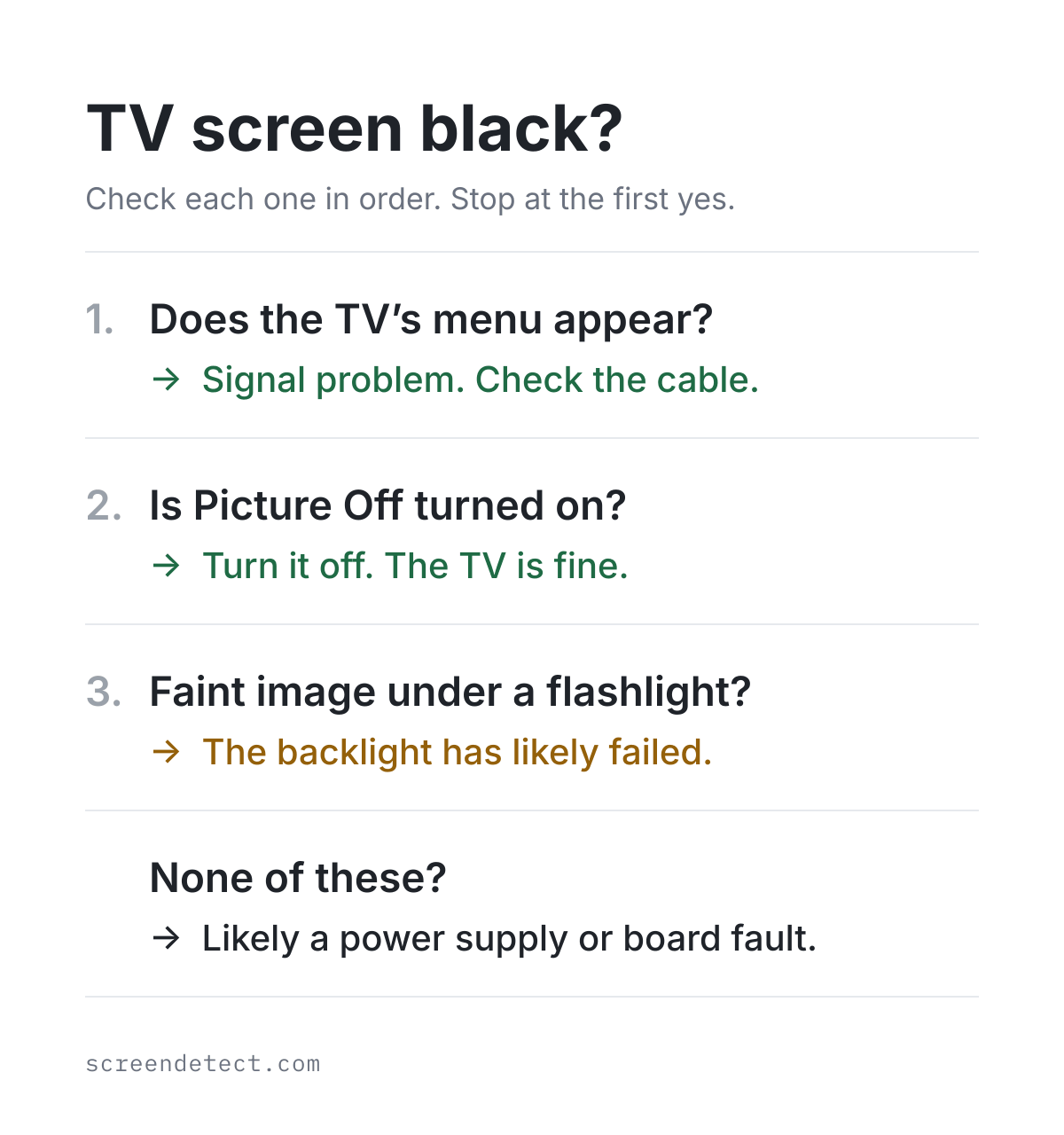
If your TV turns on but the screen stays black, press Home, Menu or a volume button on the remote. If the TV's own menu or volume bar appears, the screen and its backlight are working. The problem is the picture coming in: the wrong input, a loose HDMI cable, or the streaming stick, console or cable box.
If nothing appears but you can hear sound, shine a flashlight at the screen. On most TVs that aren't OLED, a faint picture under the light means the backlight has stopped working. No picture at all points to a power or board fault. Neither check needs tools or means opening the TV.
It's also worth checking when you bought the TV. If it's still within the store's return window or the manufacturer's warranty, a hardware fault should be the store's or the manufacturer's problem to fix.
Does the TV show its own menu?
This one check splits a black screen into two very different problems. The TV draws its own menu and volume bar without help from any outside device, so if those appear, the screen is fine. Samsung's support guide uses the same test: if the menu shows completely, the TV doesn't need service. LG suggests pressing volume, and Vizio suggests pressing Menu.
What you see
- What it means
- The screen works. Check the input and cable.
What you see
- What it means
- The backlight or a board may be failing. Do the flashlight test.
What you see
- What it means
- Check the screen-off settings, then do the flashlight test.
What you see
- What it means
- A power or board fault. Count the blinks for support.
What you see
- What it means
- No power is reaching the TV. Try another wall outlet.
Swipe table to view all columns.Scroll table to view all columns.
| What you see | What it means |
|---|---|
| Menu or volume bar appears | The screen works. Check the input and cable. |
| Menu is cut off or partly dark | The backlight or a board may be failing. Do the flashlight test. |
| Sound, but no menu or logo | Check the screen-off settings, then do the flashlight test. |
| No sound, standby light blinks | A power or board fault. Count the blinks for support. |
| No sound and no light | No power is reaching the TV. Try another wall outlet. |
Check whether the screen was turned off on purpose
Many TVs have a setting that turns the screen off while sound keeps playing. It's meant for listening to music or saving power, but it looks exactly like a broken screen, so rule it out first whenever you can hear sound.
Settings that blank the screen while sound plays
- Roku TV (TCL, Hisense, Onn and other Roku TVs): press the Star button, open Options and look for Picture off. Roku's guide says to press OK to bring the picture back.
- LG: the Screen Off option in Energy Saving turns the screen off. LG says to press any button except power or volume to turn it back on.
- Samsung: Picture Off is an accessibility setting that turns the screen off and keeps the sound. It's under Settings, General (or General & Privacy), Accessibility, and you can also reach it by pressing and holding Mute. Samsung's accessibility guide covers it.
- Hisense Google TV: Picture Off is under Settings, System, Power & Energy, Power. The Hisense manual says to press any button except power, volume or mute to bring the picture back.
- Vizio: some models have a Blank Screen option under Menu, System, Timers. Vizio's manual says any button except volume or mute turns the picture back on.
An LG OLED running its Pixel Refresher
LG OLED TVs run a Pixel Refresher cycle to keep the picture even, and it takes about an hour or more. If you start it from the menu, the screen turns off while it runs, which can look like a fault. Give it time before assuming the worst. LG's guide notes that it also runs on its own after the TV is switched off, and turning the TV back on stops it.
If the menu appears: fix the signal
When the TV can show its own menu, the screen is fine. The next step is to work out whether the input, the cable, the HDMI port or the device you're watching is at fault.
Wrong input or source
Press Input or Source and step through each HDMI input slowly. Roku's black-screen guide suggests pausing about 10 seconds on each one, because some devices take a moment to send a picture.
HDMI cable and port
- Unplug the HDMI cable at both ends and plug it back in firmly.
- Move it to a different HDMI port on the TV, then select that input.
- Try a cable you know works. Samsung TVs can test the cable themselves: Settings, Support, Device Care, Self Diagnosis, Signal Information, then HDMI Cable Test.
- For 4K at 120Hz from a PS5, Xbox or PC, use a cable with the Ultra High Speed HDMI certification label.
Black screen from a streaming stick, console or cable box
If only one device shows black, such as a Fire TV Stick, Apple TV, Chromecast, Roku player, game console or cable box, the TV is probably fine. Unplug that device from power for a minute, then try it on another HDMI port, or on another TV if you have one. As Samsung puts it, if the device shows a picture in another setup, the TV isn't the cause.
4K, HDR and enhanced HDMI settings
A 4K or HDR device only works if the HDMI port it's plugged into supports the same features. If a 4K device shows black while your other devices work:
- Try a different HDMI port. On some TVs, only certain ports support the copy protection 4K devices use (HDCP 2.2). Sony also suggests connecting the device straight to the TV if an older AV receiver sits in between.
- On LG TVs, turn ULTRA HD Deep Colour off for that port, or move the device to a port that supports it, as LG's guide describes. Samsung calls a similar setting Input Signal Plus.
- Lower the device's own video output (for example, from 4K 120Hz to 4K 60Hz) and see if the picture returns.
If nothing appears: the flashlight test
Use this test when the TV makes sound or shows a standby light but the menu never appears. It works on LED TVs, which are LCD TVs lit from behind by LEDs. It doesn't apply to OLED TVs, which are covered below.
How to do the flashlight test
- Turn the TV on and play something with sound, or wait until you'd normally see the home screen.
- Darken the room if you can.
- Hold a bright flashlight (a phone flashlight works) close to the screen, at a slight angle.
- Move the light across several areas of the screen and look for faint shapes, menus or moving images.
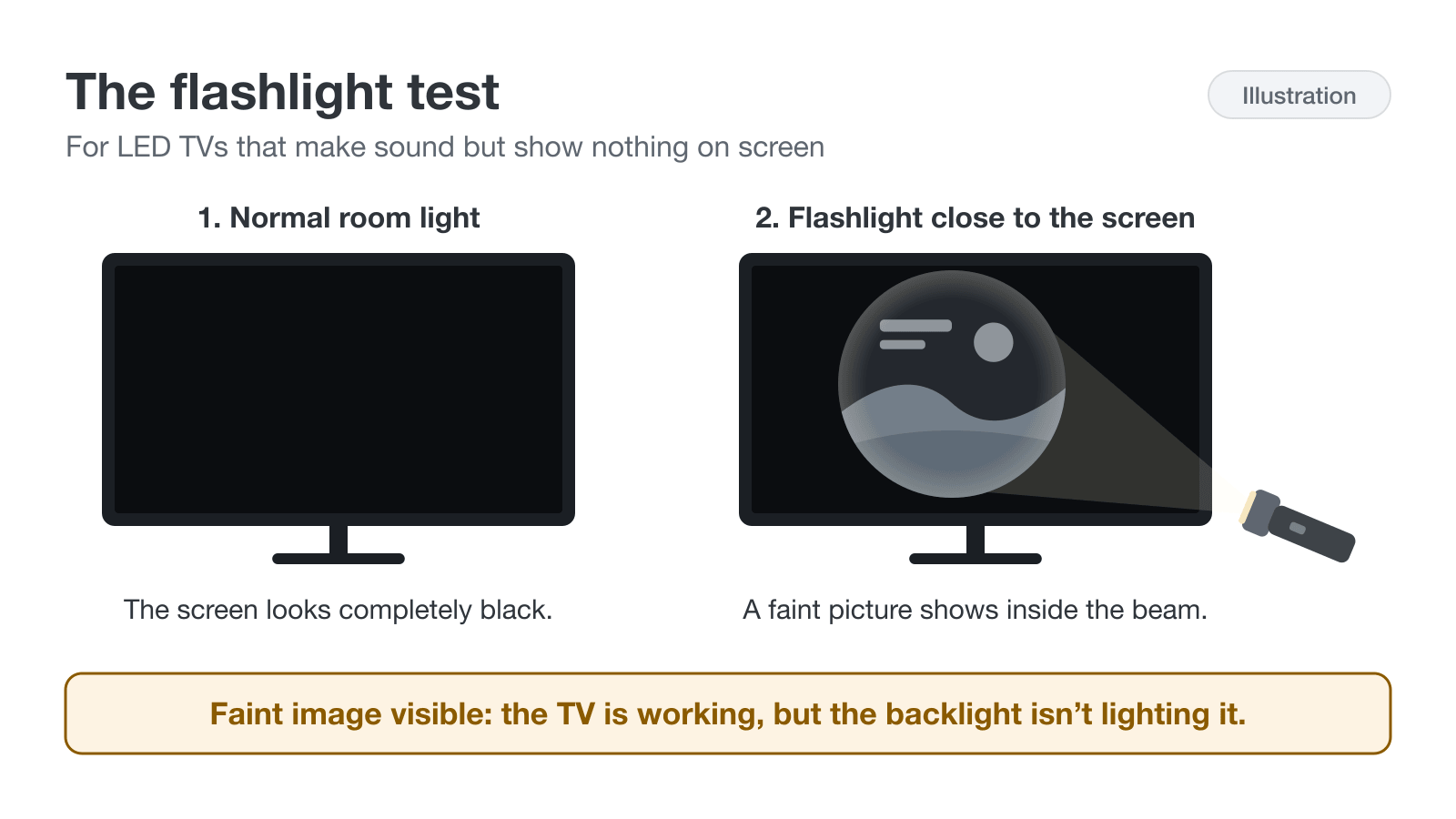
iFixit's troubleshooting guide uses the same check.
What a faint image under the flashlight means
If you can see a dim picture, the TV is creating the image but nothing is lighting it from behind. That suggests the LED backlight has failed. The backlight is made of strips of small LEDs, and according to iFixit, when one LED fails, the whole backlight usually stops working. Heat is a leading cause.
Backlight failure is not unusual. In RTINGS' long-term test of about 100 TVs, run from November 2022 to September 2025, backlight issues were by far the most common failure: 34% of the LED TVs tested had at least one failed LED. That test runs TVs much harder than a normal home does, so it shows which failures are typical, not how likely your TV is to fail.
What it means if you see nothing under the flashlight
If there's no image at all, the cause can be the power supply board, the T-con board (which drives the screen) or the main board, as iFixit explains. The flashlight test can't tell which one. A repair technician or the manufacturer's support team will want to know what else you've noticed, such as whether there's sound and what the standby light is doing.
OLED TVs
OLED TVs don't have a backlight. Each pixel makes its own light, so a flashlight won't reveal anything useful. On an OLED TV, rely on the menu check, the brand's built-in picture test and the manufacturer's support team.
Restart, test and reset steps by TV brand
Each brand publishes its own black-screen steps, and they don't match. The table shows what each brand says to do when the screen gives you nothing to navigate, and the notes below cover each brand's built-in picture test. Unplugging means pulling the plug from the wall, not just pressing power.
TV brand
- If you can't see any menu
- Hold the pinhole reset button for about 12 seconds.
TV brand
- If you can't see any menu
- Hold Power while plugging in, then choose Factory Reset.
TV brand
- If you can't see any menu
- Unplug for 30 seconds, then contact Samsung.
TV brand
- If you can't see any menu
- If the volume bar never appears, contact LG.
TV brand
- If you can't see any menu
- Hold the TV's Power/Input button for 12 to 20 seconds.
TV brand
- If you can't see any menu
- Unplug for 60 seconds, then contact Hisense.
TV brand
- If you can't see any menu
- Count the red blinks, then unplug for 2 minutes.
TV brand
- If you can't see any menu
- Hold Back and Right on the remote for 10 seconds.
Swipe table to view all columns.Scroll table to view all columns.
| TV brand | If you can't see any menu |
|---|---|
| Roku TV (TCL, Hisense, Onn) | Hold the pinhole reset button for about 12 seconds. |
| TCL (Google TV) | Hold Power while plugging in, then choose Factory Reset. |
| Samsung | Unplug for 30 seconds, then contact Samsung. |
| LG | If the volume bar never appears, contact LG. |
| Vizio | Hold the TV's Power/Input button for 12 to 20 seconds. |
| Hisense | Unplug for 60 seconds, then contact Hisense. |
| Sony | Count the red blinks, then unplug for 2 minutes. |
| Fire TV (Insignia, Toshiba, Omni) | Hold Back and Right on the remote for 10 seconds. |
A factory reset erases your apps, logins and settings, and it can't fix a failed backlight or board. Save it for last, after the menu and flashlight checks point to a software problem.
Roku TVs (TCL, Hisense, Onn and others)
Plug the TV straight into a wall outlet instead of a power strip. If the outlet has Test and Reset buttons (a GFCI outlet), press Reset. If the screen stays black, Roku's guide uses the recessed reset button on the back or bottom of the TV: hold it with a paper clip for about 12 seconds until the status light glows dimly. TVs without the button reset by holding the power button for about 10 seconds.
Samsung
Press Home first. If the menu appears, check the source and cables, then run the picture test from Settings, Support, Device Care, Self Diagnosis, Picture Test (some models skip the Device Care step). If the test picture looks normal, the TV is fine and the source is the problem. On TVs with a One Connect box, Samsung says to disconnect the box: if a picture appears, the box needs replacing. Paths vary by year, so check Samsung's Self Diagnosis guide if yours looks different.
LG
Press a volume button. If the volume bar appears, the TV is working and the signal is the problem. If it never appears, LG says the TV needs service. To run LG's Screen Self-Diagnosis, go to All Settings, Support on 2021 and newer TVs. On 2020 models it's under Support, Additional Settings, Picture Test, and on older models under Picture, Picture Test.
TCL (Google TV)
TCL suggests unplugging the TV and any connected device for 60 seconds. If you need a factory reset and can't see the menu, TCL's Recovery Mode steps are: unplug the TV for about 30 seconds, hold the TV's power button while plugging it back in until Recovery Mode appears, then choose Wipe Data/Factory Reset and Reboot System Now. If Recovery Mode doesn't appear, leave it unplugged for 5 to 10 minutes and try again. TCL Roku TVs follow the Roku steps above.
Vizio
Unplug the TV for at least 5 seconds, then press Menu. If the menu appears, check the input, the cable and the device you're watching. Vizio's support guide says that sound with no logo, menu or picture on any input points to a display or backlight fault that needs service. A factory reset uses the Power/Input button on the TV itself, held for 20 seconds on some models and 12 seconds on newer ones, so check your manual first.
Hisense
Unplug the TV and plug it back in after 60 seconds. On VIDAA models, the Hisense manual describes a Picture Test under Settings, Support, Self Diagnosis. A normal test picture means the TV is fine and the source or cable is the problem. On Hisense Google TV models, make sure Picture Off isn't turned on.
Sony
If the power light blinks red, count how many times it flashes. Sony's help guide says the pattern repeats every three seconds. Unplug the TV for two minutes, plug it back in, and if the blinking continues, give Sony support the number of blinks. Sony doesn't publish what each number means, so don't rely on code lists from other sites.
Amazon Fire TV models (Insignia, Toshiba and Fire TV Omni)
Check the input and reseat the HDMI cables first. Amazon's guide says to restart the TV by holding Select and Play/Pause on the remote together for 3 to 5 seconds, or by unplugging it for at least 30 seconds. A factory reset uses Back and Right held together for 10 seconds.
Half the TV screen is black or dark
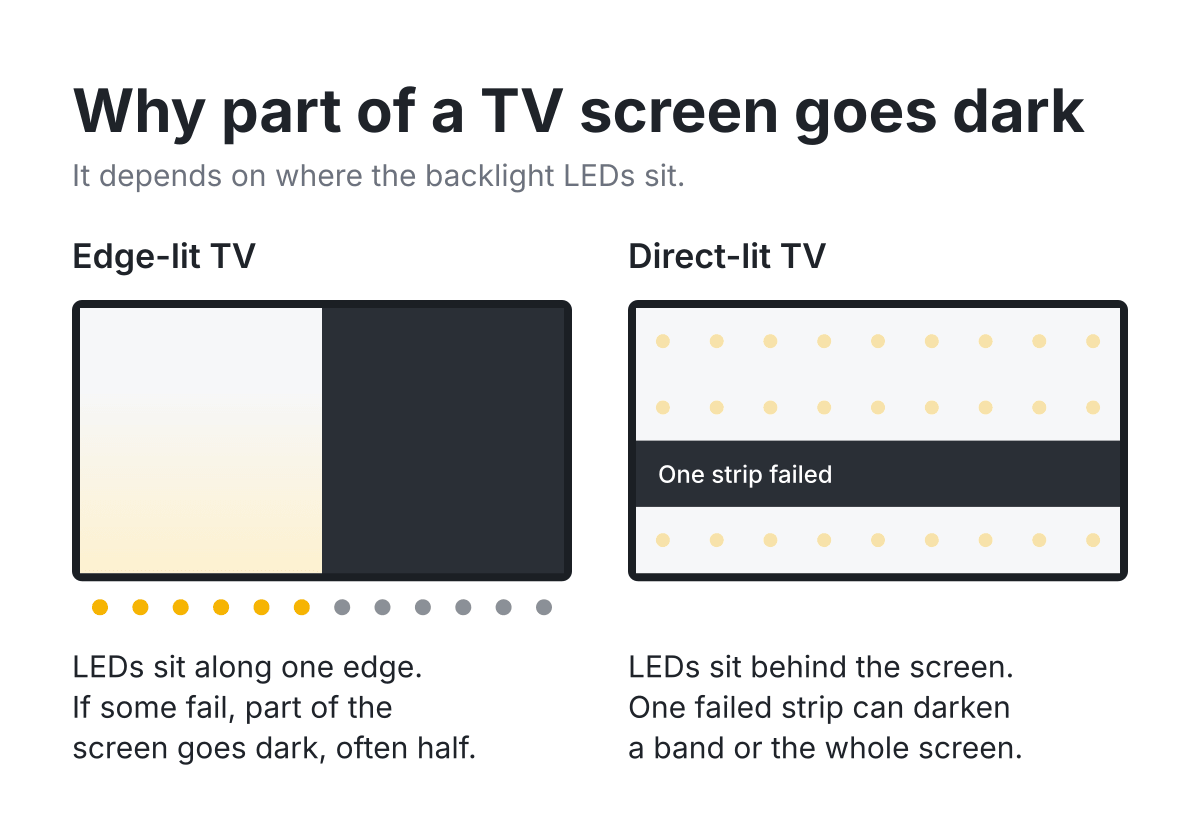
When only part of the screen goes dark, where the dark area sits is a useful clue. On edge-lit TVs, where the LEDs run along one or two edges, a failing backlight often shows up as a dark half. According to iFixit, a T-con board fault usually affects the whole screen, while some main board faults show up on only part of it. Shine the flashlight on the dark half: a faint image there points to the backlight.
Problems that look like a black screen
- A very dim picture you can still see: usually Energy Saving or a brightness setting, sometimes a weak backlight. Check the picture and power settings first.
- Black spots or blotches on part of the screen: often damage under the glass. Start with our guide to dark spots on a screen.
- Vertical or horizontal lines: a connection or screen fault. See the guide to screen lines.
- Uneven glow along the edges on dark scenes: backlight bleed. Once the picture is back, the backlight bleed test shows how uneven it is.
- A faint image that stays on screen: image retention or burn-in. The burn-in test helps you tell which.
- The picture flickers or flashes before going dark: often a setting, cable or backlight problem. See our guide to a flickering TV screen.
Mistakes that can make a black TV screen worse
- Don't take the back off. iFixit warns that the power supply board has exposed high-voltage areas, so opening the TV risks a shock as well as more damage.
- Skip the "tape method" and similar video fixes that involve opening the TV and taping over parts of a board. They can cause more damage, and damage you cause yourself usually isn't covered by the warranty.
- Don't press on the screen to see whether the picture comes back. Pressure can damage the layers behind the glass.
- Anchor the TV if you move it to reach the cables or ports. According to the CPSC, TV and furniture tip-overs send about 17,800 people to the emergency room each year, and most of those killed are young children.
- Don't start with a factory reset. Write down your settings and make sure you know your streaming logins before you erase everything.
Is it worth fixing? Warranty, returns and repair costs
A black screen caused by a failed backlight or board is a hardware fault. Who pays for it depends mostly on when and where you bought the TV.
Check your return window first
If the TV is new, returning it is usually faster than a warranty repair. These return windows were checked on November 13, 2026:
- Costco: 90 days for televisions.
- Amazon: 30 days for most items. Items bought November 1 to December 31, 2026 can be returned through January 31, 2027.
- Walmart: 30 days for most electronics. Holiday purchases made October 1 to December 31 can be returned until January 31.
- Best Buy: purchases made October 30 to December 31, 2026 can be returned through January 15, 2027, or January 31 for My Best Buy Plus and Total members. At other times of year, check Best Buy's current return window.
- Target: 30 days for electronics.
Manufacturer warranty and what it covers
Most TVs sold in the US come with a one-year warranty on parts and labor, including TCL, Hisense, LG and Vizio. Commercial use is often covered for less. Some LG OLED models add panel-only coverage in years two to five, but you pay for the labor. If you bought the TV at Costco, Costco extends the manufacturer's warranty to up to 2 years.
Even without a written warranty, US law gives you an implied warranty that a product will work as it should, and in some states it lasts several years. A company also can't void your warranty just because you used an independent repair shop or another company's part, although it can still deny coverage for damage that repair caused.
Credit card extended warranty
Some credit cards extend the manufacturer's warranty if you paid with the card. Chase Sapphire cards, for example, add one year to eligible US warranties of three years or less. Coverage varies by card and changes over time, so check your card's benefit guide before you pay for a repair.
Typical repair costs
Repair prices vary by model and area. Treat these national ranges from Fixr, updated February 2026, as a rough guide rather than a quote:
Repair
- Typical cost
- $100 to $200
Repair
- Typical cost
- $200 to $475
Repair
- Typical cost
- $200 to $450
Repair
- Typical cost
- $400 or more, often more than a new TV
Swipe table to view all columns.Scroll table to view all columns.
| Repair | Typical cost |
|---|---|
| Backlight | $100 to $200 |
| Power supply board | $200 to $475 |
| Main board | $200 to $450 |
| Screen (panel) replacement | $400 or more, often more than a new TV |
Compare any quote with the price of a similar new TV. A backlight repair can make sense on a larger or higher-end TV, while replacing the screen itself rarely does.
Recycling a TV that isn't worth fixing
Look for an electronics recycler certified to R2 or e-Stewards, the certifications the EPA lists. Many states run e-waste recycling programs, often paid for by manufacturers. Some retailers, including Best Buy, also take TVs back, usually for a fee that varies by state.
What to write down before you contact support
Support agents and repair shops ask the same questions, and having the answers ready makes a warranty claim or return much faster:
- The model number and serial number, from the sticker on the back of the TV.
- When the black screen started and what happened just before, such as a power outage, a software update or moving the TV.
- Whether the menu appears, whether there's sound, and what the standby light is doing.
- What you saw in the flashlight test, ideally with a short phone video.
- Each step you've already tried.
For a fuller checklist, see our guide to documenting damage for a warranty claim.
Common questions
Why does my TV have sound but no picture?
Usually because the TV is working but the screen isn't getting a picture or isn't being lit. Press Home or Menu: if the menu appears, the problem is the input or cable. If nothing appears, a flashlight test can show whether the backlight has failed.
Can a power outage or surge cause a black screen?
Yes. A surge can damage the power supply or other boards, and an outage can leave the TV or a connected device stuck. Unplug the TV and anything connected to it, wait the time your brand recommends, and try again before assuming the TV is damaged.
Will a factory reset fix a black screen?
Only if the cause is software, and only if you can reach the menu or your brand has a reset that works without it. A factory reset can't fix a failed backlight or board, and it erases your apps and settings.
Is a TV with a dead backlight worth repairing?
Sometimes. Fixr's national range for a backlight repair is $100 to $200, which can be worth it for a larger or newer TV but not for an inexpensive one. Check your return window and warranty first, since the repair may cost you nothing.
Related guides
Black patches or blotches on part of the screen rather than a fully black picture.
Vertical or horizontal lines across the picture.
Check for uneven glow along the edges once the picture is back.
What to photograph and record before you contact support.
Sources
- What to do if your Samsung TV has a black screen
Samsung US · Menu check, input and cable steps, HDMI Cable Test and One Connect check. Checked November 13, 2026.
- Use Self Diagnosis on your Samsung TV
Samsung US · Picture Test and Self Diagnosis menu paths by model year. Checked November 13, 2026.
- Troubleshooting picture and sound using the TV's self-diagnosis feature
LG US · Screen Self-Diagnosis and Picture Test paths by model year. Updated July 17, 2026; checked November 13, 2026.
- Sound but no picture on an LG TV
LG US · Volume-bar check and service guidance. Checked November 13, 2026.
- Automatic power saving mode on LG webOS TVs
LG US · Screen Off and how to turn the screen back on. Dated August 14, 2025; checked November 13, 2026.
- Troubleshooting image burn-in on LG TVs
LG US · Pixel Refresher runs after the TV is turned off and takes about an hour or more. Dated June 26, 2026; checked November 13, 2026.
- Fix a Roku TV that has a black screen
Roku Support · Cable, input and power steps. Updated June 24, 2026; checked November 13, 2026.
- Roku TV won't turn on or has no picture
Roku Support · Outlet and GFCI checks; reset button held about 12 seconds. Updated June 26, 2026; checked November 13, 2026.
- Listen to music with the screen off
Roku Support · Picture off option on Roku TVs and how to turn the picture back on. Checked November 13, 2026.
- My TV is on but there is no picture or sound
TCL Support · Unplug for 60 seconds; factory reset paths for Roku, Google TV and Fire TV models. Checked November 13, 2026.
- Factory reset a TCL Google TV
TCL Support · Recovery Mode reset by holding Power while plugging in. Checked November 13, 2026.
- TCL limited product warranty (2025)
TCL North America · One year parts and labor for non-commercial use. Checked November 13, 2026.
- The power LED blinks red
Sony Help Guide · Count the red blinks and unplug for two minutes. Checked November 13, 2026.
- No picture from a 4K source device (HDCP 2.2)
Sony Support · HDCP 2.2 port and receiver compatibility. Last modified January 16, 2026; checked November 13, 2026.
- ULTRA HD Deep Colour settings
LG · Turn Deep Colour off or use another HDMI port if a device does not support it. Checked November 13, 2026.
- No video, no picture, black screen
Vizio Support · Power cycle, Menu check and muted-screen fix. Checked November 13, 2026.
- D-Series user manual (2022)
Vizio · Blank Screen under Menu, System, Timers; reset by holding the Power/Input button 20 seconds; one-year non-commercial warranty. Checked November 13, 2026.
- Mini LED 4K Smart TV user manual (2026)
Vizio · Press and hold the Power/Input button 12 seconds to reset the TV to default settings. Checked November 13, 2026.
- Hisense VIDAA TV user manual (32A4GV)
Hisense USA · Picture Test under Settings, Support, Self Diagnosis; unplug and replug after 60 seconds. Checked November 13, 2026.
- Hisense Google TV user manual
Hisense USA · Picture Off under Settings, System, Power & Energy; press any button except power, volume or mute to restore. Checked November 13, 2026.
- Accessibility features on Samsung TVs
Samsung US · Picture Off turns the screen off and keeps the sound; shortcut by holding Mute. Checked November 13, 2026.
- Fire TV Smart TV is unresponsive
Amazon · Restart with Select and Play/Pause; unplug at least 30 seconds; reset with Back and Right. Checked November 13, 2026.
- Returns and refunds
Amazon · Most items returnable within 30 days; holiday window for November 1 to December 31, 2026 purchases. Checked November 13, 2026.
- Walmart standard return policy
Walmart · Most consumer electronics returnable within 30 days; holiday purchases returnable until January 31. Checked November 13, 2026.
- 2026 holiday calendar
Best Buy · Purchases from October 30 to December 31 returnable through January 15, 2027 (January 31 for Plus and Total members). Published October 27, 2026; checked November 13, 2026.
- Costco extended warranty on electronics
Costco Technical Support · Costco extends the manufacturer's warranty on televisions to up to 2 years. Checked November 13, 2026.
- Hisense TV one-year limited warranty
Hisense USA · One year parts and labor from an authorized US dealer. Checked November 13, 2026.
- LG TV limited warranty
LG US · One year parts and labor on LG TVs. Checked November 13, 2026.
- LG OLED 5-year panel warranty card (2025)
LG US · Panel-only coverage in years two to five on eligible OLED models. Checked November 13, 2026.
- TV has sound but no picture
iFixit · Flashlight test and how backlight, T-con and main board faults differ. Checked November 13, 2026.
- TV backlight issue
iFixit · Heat as a leading cause of LED backlight failure; one failed LED can stop the whole backlight. Checked November 13, 2026.
- TV longevity test: failures
RTINGS · Accelerated test of about 100 TVs from November 2022 to September 2025; backlight issues were the most common failure. Published November 6, 2025; checked November 13, 2026.
- Ultra High Speed HDMI Cable certification
HDMI Licensing Administrator · Certification label for cables used with 4K 120Hz and 8K devices. Checked November 13, 2026.
- CPSC urges fans to anchor TVs and furniture
U.S. Consumer Product Safety Commission · About 17,800 tip-over injuries a year; most deaths are young children. February 5, 2026; checked November 13, 2026.
- Warranties
Federal Trade Commission · Written and implied warranties, including the implied warranty of merchantability. Checked November 13, 2026.
- FTC says companies' warranty restrictions were illegal
Federal Trade Commission · A company can't void a warranty or refuse a repair solely because you used another company's part or an independent shop. July 7, 2022; checked November 13, 2026.
- What is Costco's return policy?
Costco Customer Service · 90-day returns for televisions and other major electronics. Checked November 13, 2026.
- Returns and exchanges
Target · 30-day returns for electronics. Checked November 13, 2026.
- Extended warranty protection with Chase Sapphire
Chase · Adds one year to eligible US manufacturer warranties of three years or less. Checked November 13, 2026.
- TV repair cost
Fixr · National cost ranges for backlight, board and panel repairs. Updated February 20, 2026; checked November 13, 2026.
- Certified electronics recyclers
U.S. EPA · R2 and e-Stewards certified recyclers. Checked November 13, 2026.
- State electronic waste recycling laws
National Conference of State Legislatures · Statewide e-waste recycling programs. Checked November 13, 2026.